

TL;DR:
- Properly structured remote work channels enhance productivity, ensure security, and reduce data risks for enterprises. Organizations must assess precise requirements, select AI-enabled platforms, and implement robust configurations to optimize communication workflows. Continuous management, user training, and cultural reinforcement are essential for sustained success in remote collaboration.
Remote work communication that lacks proper structure doesn't just frustrate employees — it bleeds productivity and exposes enterprise data to serious risk. Employees spend 28% of their workweek just searching for information inside chat apps, a staggering waste that compounds every time your channels aren't configured thoughtfully. For IT and communications managers, the stakes are high: every unstructured group chat, every misconfigured permission, and every ignored compliance policy is a liability. This guide gives you a clear, step-by-step path to deploying remote work channels that are both genuinely secure and ready to leverage modern AI workflows.
Table of Contents
- Assessing requirements for remote work channels
- Choosing the right platform and AI features
- Step-by-step: Configuring secure and efficient remote channels
- Common mistakes and troubleshooting tips
- What to expect: Results and key ROI metrics
- Perspective: Why setup is only half the battle — what most IT teams overlook
- How Luxenger supports enterprise remote work channels
- Frequently asked questions
Key Takeaways
| Point | Details |
|---|---|
| Requirements first | Define business, IT, and security needs before choosing your remote work platform. |
| AI is a force multiplier | Integrated AI features can save up to 7 hours per employee each week. |
| Security and compliance matter | Prioritize platforms with advanced compliance controls to protect sensitive data. |
| Iterate post-launch | Continuous optimization and user feedback make remote channels effective long-term. |
| Measure and adapt | Track metrics like time savings and user adoption to quantify ROI and drive improvements. |
Assessing requirements for remote work channels
To solve productivity gaps and align with security standards, start by clarifying your exact requirements before you evaluate a single vendor demo.
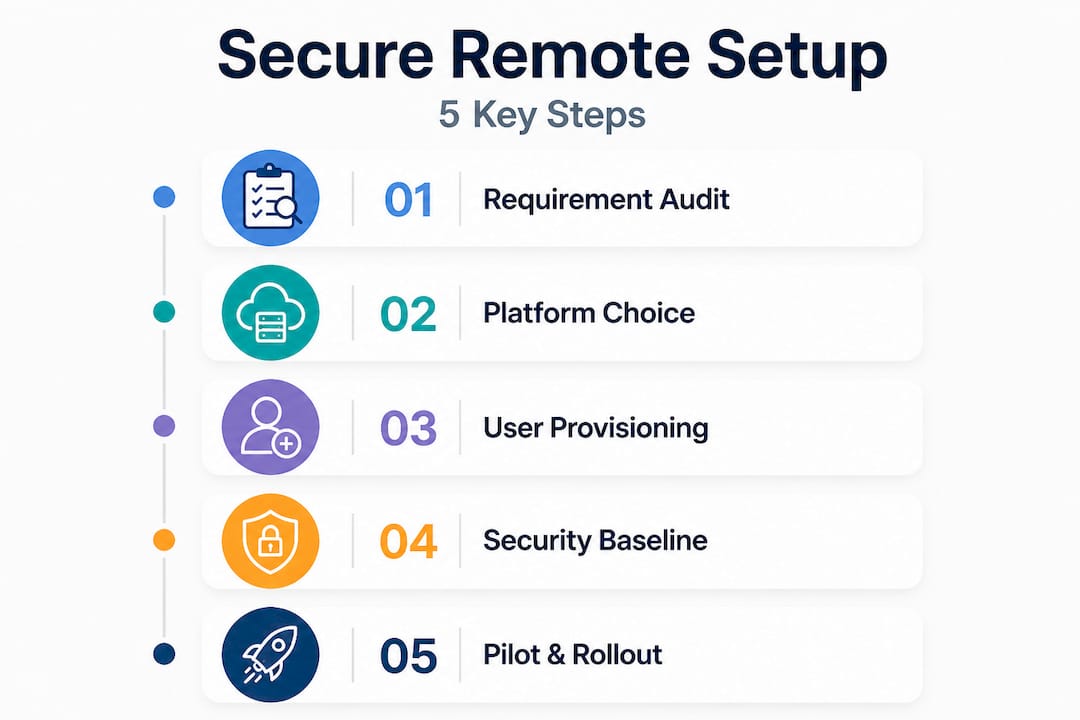
The first question isn't "which tool?" — it's "what do we actually need?" Start by mapping your business requirements. Does your organization operate across time zones, requiring asynchronous-first design? Do you handle regulated data that demands DLP (Data Loss Prevention) or FedRAMP (Federal Risk and Authorization Management Program) certification? How many users will be on the platform simultaneously, and how fast does that number need to scale? These answers will immediately filter out tools that look good on paper but won't fit your actual environment.
Alongside business requirements, define your technical prerequisites. Your checklist should include:
- Network security: VPN policies, zero-trust access controls, and firewall rules for platform traffic
- Device management: MDM (Mobile Device Management) enrollment requirements, BYOD (Bring Your Own Device) policies, and endpoint compliance enforcement
- Integration capability: APIs and connectors for your existing HRIS, ticketing systems, and identity providers (Active Directory, Okta, etc.)
- Redundancy and uptime: SLA commitments, failover architecture, and disaster recovery expectations
It's also worth noting where the market is heading. According to the UCaaS market 2025 Gartner Magic Quadrant, Cisco, Microsoft, RingCentral, and Zoom lead in AI-enhanced workflows, and Gartner predicts 90% of enterprise telephony will be cloud-based by 2028. Building toward that trajectory now saves you a costly re-platform later.
| Platform | AI features | Compliance certifications | Scalability | Relative cost |
|---|---|---|---|---|
| Microsoft Teams | Copilot, Facilitator agents | FedRAMP, Purview DLP | Enterprise-grade | High |
| Slack | Slack AI, Slackbot | SOC 2, limited FedRAMP | Mid to enterprise | Medium-high |
| Zoom | AI Companion | SOC 2, FedRAMP moderate | Mid to enterprise | Medium |
| Cisco Webex | AI Assistant | FedRAMP, HIPAA | Enterprise-grade | High |
| RingCentral | RingSense AI | SOC 2, HIPAA | Mid to enterprise | Medium |
Understanding how these platforms stack up against enterprise security best practices will save you from costly surprises post-deployment. The future of remote work collaboration is clearly cloud-native and AI-first, so anchoring your requirements in that direction is non-negotiable.
Pro Tip: Prioritize platforms that have mature, company-wide AI integration — not just beta features available to premium tiers. If AI is bolted on rather than built in, you'll spend months waiting for feature parity across your user base.
Choosing the right platform and AI features
With your requirements mapped, you're ready to evaluate and select the platform and AI features best suited for your environment.
Platform selection is a decision with long legs. The wrong choice doesn't just mean switching tools in a year — it means migrating data, retraining staff, and rebuilding integrations. Approach it with a structured framework rather than instinct or vendor preference.
Step 1: Audit your existing stack. List every tool your teams currently use for communication, project management, and file sharing. Identify overlaps and gaps. A platform that eliminates three separate tools is worth more than its license cost suggests.
Step 2: Map compliance requirements to platform capabilities. If you're in healthcare, finance, or government contracting, your shortlist is defined by certification requirements before you ever look at features. Non-compliant platforms aren't options, regardless of how good the AI is.
Step 3: Evaluate migration hurdles. Assess data portability from your current tool, the learning curve for IT admins, and vendor support quality during migration. Platforms with dedicated enterprise onboarding teams dramatically reduce rollout risk.
Step 4: Model total cost of ownership. Seat-based pricing looks predictable, but add-on AI features, storage overages, and compliance module fees can inflate your actual spend by 30 to 50% over sticker price.
Step 5: Run a structured pilot. Select a representative cross-section of 20 to 50 users across roles and technical comfort levels. Measure adoption rate, support ticket volume, and task completion speed before committing.
Here's how the leading platforms compare on AI-specific functionality, a critical factor when you're designing AI collaboration tools for productivity:
| Platform | Meeting summarization | Task extraction | Channel automation | Real-time translation |
|---|---|---|---|---|
| Microsoft Teams | Yes (Copilot) | Yes (Facilitator) | Yes | Yes |
| Slack | Yes (Slack AI) | Limited | Yes (Workflow Builder) | No (third-party) |
| Google Workspace | Yes (Gemini) | Yes | Yes | Yes |
| Zoom | Yes (AI Companion) | Yes | Limited | Yes |
Major platforms including Microsoft Teams with Copilot, Slack AI, Google Gemini, and Zoom AI Companion all provide summarization, note-taking, and task extraction inside channels and meetings. The differentiator isn't whether they offer AI — it's how deeply it integrates into daily workflows and whether it works across your entire user base without per-seat add-on fees.
Understanding AI's impact on team communication should inform how heavily you weight these capabilities in your selection rubric. For teams managing dozens of concurrent projects and channels, AI summarization alone can reclaim hours every week. Check essential remote work tools for a broader look at how communication platforms fit into a complete remote work stack.
Pro Tip: Select a platform where AI automation can be deployed company-wide from a central admin console, not configured individually by each team. Siloed AI adoption creates inconsistent experiences and undermines the ROI you're pitching to leadership.
Step-by-step: Configuring secure and efficient remote channels
Once you've chosen your platform and features, follow these steps to safely and effectively deploy your remote work channels.

1. Provision users through your identity provider. Integrate your platform with Active Directory or Okta using SAML (Security Assertion Markup Language) or SCIM (System for Cross-domain Identity Management) to automate user lifecycle management. Manual provisioning at scale is error-prone and creates orphaned accounts.
2. Enforce MFA and SSO from day one. Multi-factor authentication (MFA) and Single Sign-On (SSO) are non-negotiable baseline controls. Configure them before any user logs in, not as a post-launch cleanup task.
3. Define roles and permissions with least-privilege principles. Create role tiers: admins, team leads, standard users, and external guests. Restrict data export, screen sharing, and bot installation to appropriate roles only.
4. Structure your channels deliberately. Use a stratified design: project channels for task-specific work, announcement channels for broadcast communications with restricted posting, and informal channels for the social interaction that remote teams need to stay cohesive. Over-permissioning channels is one of the most common post-launch complaints from end users.
5. Enable and configure AI assistants. Turn on meeting summarization, AI notes, and task extraction at the org level. Set clear data retention and processing policies before enabling AI features, because your AI layer will have access to conversation data by default.
6. Apply DLP and compliance policies. Configure keyword-based DLP rules to catch accidental sharing of PII, financial data, or IP. Platforms like Microsoft Teams offer Purview DLP integration, while Slack's compliance controls vary by tier.
Compliance warning: No major enterprise communication platform currently offers native end-to-end encryption. Data is encrypted in transit, but not at rest in a way that prevents platform-side access. For organizations handling highly classified data, this requires supplemental controls and should be disclosed in your risk register. Slack vs. Microsoft Teams confirms Teams offers superior compliance depth including FedRAMP, while Slack's compliance features remain tier-limited.
7. Activate AI features for secure messaging selectively. Not every channel needs full AI automation. Sensitive channels (legal, HR, executive) may warrant restricted AI note-taking to limit data exposure.
8. Run a pilot and audit before full rollout. Test with a representative group, review audit logs for unexpected permission usage, validate DLP triggers, and confirm AI summaries are accurate and appropriately scoped. These remote team collaboration best practices reinforce that pre-launch pilots consistently reduce post-launch support burden.
Common mistakes and troubleshooting tips
Even with the best plans, implementation can reveal surprises. Here's how to steer clear of the most common pitfalls.
Most rollout failures aren't technical. They're the result of predictable shortcuts taken under deadline pressure. Recognizing them early saves significant remediation effort.
Common mistakes to avoid:
- Over-permissioning at launch: Granting all users admin or full-access rights "temporarily" during onboarding and never tightening them. This creates permanent security gaps.
- Weak device controls: Allowing unmanaged personal devices to access enterprise channels without MDM enrollment or at minimum, conditional access policies.
- Ignoring default AI data handling: Many platforms process AI-generated summaries through third-party models. Review your vendor's data processing agreement before enabling AI features, especially for sensitive teams.
- Inadequate user training: Assuming employees will intuit channel etiquette, AI tools, and security expectations. Without structured onboarding, adoption falters and shadow IT (unauthorized tool use) resurges.
- No ongoing channel governance: Channels multiply. Without a naming convention policy and regular audits, you'll have 200 channels within six months, most of them abandoned.
For troubleshooting common rollout challenges: if users report notification overload, audit your default notification settings and introduce AI-driven digest summaries. If performance is lagging, check for bandwidth constraints on VPN tunneling and evaluate split-tunneling configurations. If AI summaries are inaccurate, verify that meeting transcription language settings match your user base.
Reviewing AI collaboration tool pitfalls gives additional context on where AI-powered rollouts typically go wrong. For peer-level guidance, productivity tips for tech teams covers leadership-focused strategies for sustaining remote team output.
The data makes a compelling case for getting this right. AI-enabled platforms save up to 7 hours per employee per week in documented enterprise cases, but only when the platform is properly configured and employees are trained to use it.
Pro Tip: Analyze AI usage metrics monthly. Most platforms provide dashboards showing which features are actually being used. If AI summarization adoption is low, it's a signal of a training gap, not a feature failure. Adjust your enablement program accordingly.
What to expect: Results and key ROI metrics
With your channels activated and running, here's what you should measure to verify success and sustain continuous improvement.
Deployment is just the starting line. The real value comes from consistent monitoring and iterative improvement. Establish your baseline metrics before launch so you have a genuine before-and-after comparison to present to leadership.
Stat callout: Microsoft reports employees attend an average of 18 meetings per week, and AI-enabled communication tools have demonstrated 7 hours of saved time per employee per week in enterprise environments. At scale, that's measurable headcount-equivalent capacity recovered without additional hiring.
Track AI productivity impact using a structured KPI framework:
| KPI | Baseline measurement | Target improvement | Measurement method |
|---|---|---|---|
| Time spent searching for information | % of workweek | Reduce by 50%+ | Platform analytics, surveys |
| Meeting time per employee per week | Hours/week | Reduce by 20 to 30% | Calendar integration data |
| Security incidents in channels | Incidents/month | Reduce to near zero | Audit log review |
| AI feature adoption rate | % of active users | Achieve 70%+ in 90 days | Admin usage dashboard |
| Support tickets related to comms tools | Tickets/month | Reduce by 40%+ | IT helpdesk data |
| Channel governance compliance | % channels with owner | Maintain 95%+ | Admin console audit |
Review this dashboard monthly for the first two quarters, then quarterly once you've stabilized. Connect your findings to business outcomes, reduced meeting costs, faster project turnaround, and measurable compliance improvements, to build the executive-level narrative that secures continued investment in your communication infrastructure.
Perspective: Why setup is only half the battle — what most IT teams overlook
Technical deployment is necessary. But it is nowhere near sufficient.
We've watched organizations spend months getting the platform configuration exactly right, only to see adoption stall at 40% six months after launch. The culprit is almost always the same: the technical team treated the rollout as a project with a finish line, not an ongoing product that requires continuous management.
Here's what most IT teams underestimate. Channel etiquette matters as much as channel architecture. If employees don't know which channel to use for which conversation, they'll default to email or create unofficial workarounds. Clear, written norms — posted inside the platform itself — are as important as your permission structure. This isn't a soft skill problem. It's a systems design problem that sits squarely in IT's domain.
Why organizations choose AI tools often comes down to efficiency promises. But the organizations that actually realize those gains are the ones that treat AI feature adoption as a change management initiative. They run lunch-and-learns, they share AI summary examples in team channels, and they recognize early adopters publicly. That's not HR's job alone — it requires IT champions who understand the tools deeply enough to demonstrate them convincingly.
There's also a culture dimension that gets ignored. Remote teams without strong channel culture become fragmented. The distinction between a well-governed communication platform and a chaotic one is often 90% cultural and 10% technical. Building company culture remotely requires deliberate design, and your channel structure is one of the most powerful levers you have for reinforcing it.
"The best tech stacks fail without persistent user enablement and cultural buy-in."
Iterate. Collect employee feedback at the 30, 60, and 90-day marks. Adjust channel structures, AI settings, and permission models based on what you learn. The organizations that extract the most value from their remote communication platforms aren't the ones with the most sophisticated initial setup — they're the ones with the most responsive, adaptive IT and communications teams.
How Luxenger supports enterprise remote work channels
Setting up secure, AI-ready remote work channels requires a platform designed for that purpose from the ground up, not one that layers compliance and AI onto a consumer messaging base.

Luxenger's enterprise messaging platform is built specifically for organizations that can't afford to compromise on security or communication efficiency. With bank-grade encryption standards, integrated AI-powered conversation summaries, voice huddles for quick audio collaboration, and real-time multilingual translation, Luxenger gives IT teams the tools to deploy channels that are genuinely secure and measurably productive from day one. For secure business messaging for enterprise teams that need compliance-ready infrastructure alongside modern AI workflows, Luxenger provides the integrated solution that eliminates the tradeoffs between security and functionality. Talk to our team to see a tailored deployment plan for your organization's specific environment.
Frequently asked questions
Which platforms are most secure for remote enterprise channels?
Microsoft Teams offers superior compliance depth including Purview DLP and FedRAMP certification, while Slack provides solid security features that remain tier-limited in scope. For regulated industries, Teams or Cisco Webex are typically the strongest choices.
What AI features provide the biggest impact for remote teams?
AI assists most with real-time meeting notes, conversation summarization, and task extraction, with documented results showing up to 7 hours saved per employee per week. Platforms like Teams, Slack, Workspace, and Zoom all integrate these capabilities at varying depths.
How do I ensure compliance and data privacy in remote work channels?
Enforce MFA, role-based access controls, and DLP policies from day one, and note that no native end-to-end encryption exists in major enterprise platforms, only in-transit encryption. Select platforms with the certifications your industry requires before deployment.
How can I reduce lost productivity in chat apps?
Deploy AI-powered smart search, automated summarization, and task surfacing to cut down the time employees spend hunting for information. Without these tools, employees lose 28% of their workweek to information retrieval alone.