

TL;DR:
- AI chat transforms enterprise collaboration by creating searchable, automated knowledge layers.
- Secure AI platforms must include data control, compliance, and defenses against prompt injection and data leakage.
- Successful large-scale deployment relies on governance, phased rollout, user training, and organizational alignment.
Fragmented communication costs enterprises more than most IT leaders realize. Research consistently shows that knowledge workers waste hours each week switching between apps, re-reading long message threads, and hunting for decisions buried in old channels. Yet many organizations still treat modern chat apps as the complete answer, deploying Slack or Microsoft Teams and expecting transformation. The truth is that deploying a chat app and deploying a secure AI chat solution are not the same thing. This guide breaks down exactly what AI-powered enterprise messaging delivers, what security requirements you cannot afford to skip, and how to implement it at scale without exposing your organization to new vulnerabilities.
Table of Contents
- Why AI chat is transforming team collaboration
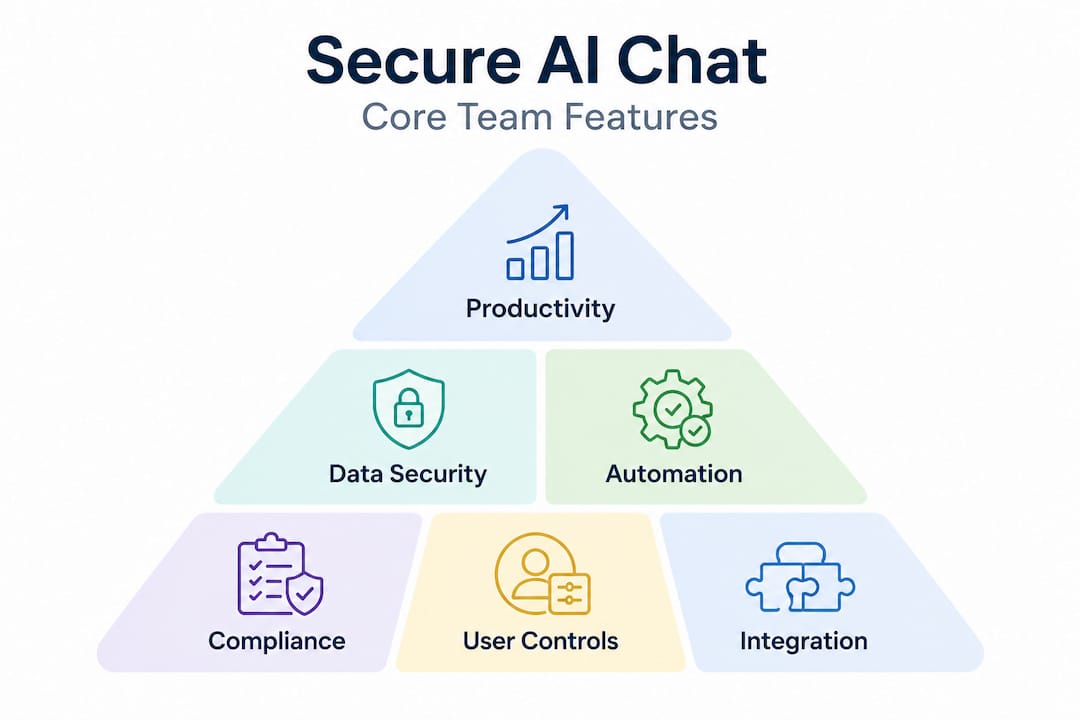
- Core features of secure AI chat for teams
- Navigating risks: Security challenges unique to AI chat
- Best practices for deploying AI chat solutions at scale
- Our take: What most IT teams overlook about AI chat for teams
- Take the next step with secure AI chat for your enterprise
- Frequently asked questions
Key Takeaways
| Point | Details |
|---|---|
| Productivity boost | AI chat cuts busywork and makes team collaboration more efficient and measurable. |
| Enterprise-grade security | Top solutions offer compliance, data protection, and tools far beyond regular chat apps. |
| Unique AI risks | IT teams must address threats like prompt injection and data leakage not covered by standard audits. |
| Plan phased rollout | Success depends on piloting, strong governance, and metrics—not just technology deployment. |
| Transformation requires buy-in | True gains come when workflows and organizational culture adapt to leverage AI chat's potential. |
Why AI chat is transforming team collaboration
Traditional enterprise messaging was built for synchronous conversation, not intelligent work. When a new employee needs context on a six-month-old product decision, they scroll through hundreds of messages, ping three colleagues, and still piece together an incomplete picture. That is context switching at its most expensive.
AI chat changes this pattern at a structural level. Instead of static message logs, AI chat platforms create living, searchable knowledge layers. Meeting notes generate themselves. Summaries surface automatically after long discussions. Relevant documents appear in context without anyone having to request them. This is where how AI changes enterprise communication becomes less of a theoretical conversation and more of a measurable business shift.
The numbers behind this shift are striking. A Forrester Total Economic Impact study on AI-assisted collaboration tools found time savings of 18.6% on meeting notes and 29.8% on data analysis tasks, with organizations reporting measurable gains in revenue, efficiency, and employee retention. Across the broader enterprise landscape, benchmarks show 20 to 40% time savings on collaboration tasks, scaling to billions of dollars in enterprise value when adoption reaches critical mass.
The key AI capabilities driving these results include:
- Automated meeting summaries that extract action items and decisions without manual transcription
- Real-time data analysis grounded in organizational content, so insights stay contextually relevant
- Knowledge sharing at scale, letting any team member query institutional history through natural language
- Intelligent notifications that reduce noise and surface only what requires attention
"Organizations that invest in measuring AI chat ROI from day one, tracking both hard time savings and softer gains like reduced onboarding time, unlock significantly faster business cases than those who deploy and wait." This reflects a pattern seen consistently among enterprises that sustain adoption past the initial rollout phase.
The competitive pressure here is real. Teams that automate routine information work gain a compounding advantage. Every hour saved on meeting recaps or data lookups is an hour redirected to creative, strategic work.
Core features of secure AI chat for teams
Understanding the productivity case is straightforward. The harder conversation for IT managers is feature evaluation, specifically, what distinguishes an enterprise-grade secure AI chat solution from a consumer tool with a chat interface bolted on.
Microsoft 365 Copilot Chat demonstrates what enterprise data protection (EDP) looks like in practice: IT controls that govern what organizational content the AI can access, integration into business apps for contextually grounded responses, and compliance architectures that prevent sensitive data from leaking outside approved boundaries. This sets a useful benchmark for any platform evaluation.
On the infrastructure side, enterprise AI APIs from providers like Azure OpenAI and Amazon Bedrock offer SOC 2 Type II, HIPAA compliance, 99.9% SLA uptime guarantees, data residency across 30 to 60 or more regions, and a firm policy of not training models on customer data by default. These are not optional extras. For healthcare, financial services, or any regulated industry, these are table stakes.
Here is how key platforms compare on the most critical enterprise dimensions:
| Feature | Microsoft Copilot | Slack AI | Generic AI chat apps |
|---|---|---|---|
| Enterprise data protection | Yes, full EDP | Partial | Rarely |
| SOC 2 Type II | Yes | Yes | Varies |
| HIPAA support | Yes | Enterprise tier | Often no |
| Self-hosting option | Limited | No | Sometimes |
| Granular IT controls | Strong | Moderate | Weak |
| No model training on data | Yes | Yes | Often unclear |
| Data residency options | 30+ regions | Limited | Rarely |
| RAG-powered responses | Yes | Limited | Rare |
The table above shows a clear capability gap between purpose-built enterprise tools and generic alternatives. For AI tools for secure productivity, IT leaders should prioritize platforms that combine retrieval-augmented generation (RAG) with agent orchestration. RAG means the AI grounds its answers in your actual documents and conversation history rather than fabricating responses from generic training data, which dramatically improves accuracy and reduces hallucination risk.
Pro Tip: When evaluating AI chat vendors, ask specifically whether their solution uses RAG or relies purely on large language model (LLM) base knowledge. RAG-powered systems give you both higher accuracy and a stronger audit trail, both of which matter enormously for AI-powered secure collaboration at the enterprise level.
Additional non-negotiable features include:
- Data loss prevention (DLP) controls that block sensitive prompts and attachments from reaching the AI layer
- Audit logging with sufficient granularity to satisfy compliance and forensic requirements
- Role-based access controls that limit what the AI can retrieve based on user permissions
- Clear model update policies so IT teams know when underlying AI capabilities change
Navigating risks: Security challenges unique to AI chat
Standard chat app security and AI chat security are not the same problem space. Organizations that treat them as equivalent are leaving themselves exposed to an entirely new category of threat.

The most pressing AI-specific risk is prompt injection. Unlike traditional cyberattacks that target infrastructure, prompt injection attacks target the AI layer itself, feeding malicious instructions through user inputs or external documents to manipulate AI behavior. Multi-turn prompt injection is especially dangerous because these attacks escalate gradually across a conversation, evading per-message detection systems by building context over multiple turns and persisting through memory or hand-off points between AI agents. This requires trajectory monitoring and provenance tracking that most standard security stacks do not include.
The second major risk is cross-context data leakage. An AI model with broad access to organizational content can inadvertently surface information from one department when responding to a query from another. Without strict permission inheritance and data boundary enforcement, the AI effectively becomes an unintentional insider threat.
Here is a comparison of classic messaging risks versus AI-specific risks:
| Risk type | Classic chat apps | AI chat platforms |
|---|---|---|
| Data interception | Yes | Yes |
| Unauthorized access | Yes | Yes |
| Prompt injection | No | Yes, high severity |
| Hallucination and false data | No | Yes |
| Cross-context data leakage | No | Yes |
| Guardrail escapes | No | Yes |
| AI-specific model poisoning | No | Yes |
The enterprise chat security guide for AI environments must go beyond the checklist that covers traditional apps. Here are the steps IT teams should follow to assess and mitigate AI-specific risks:
- Map AI data access boundaries before deployment. Know exactly what organizational content the AI can retrieve and enforce least-privilege access from day one.
- Deploy trajectory monitoring tools that track conversation patterns across turns, not just individual messages.
- Run adversarial red-team testing specifically against your AI configuration, not just your network perimeter.
- Establish AI-specific incident response playbooks so teams know how to respond when an AI behaves unexpectedly.
- Review and test guardrails quarterly, since model updates can shift behavior in ways that previous testing did not cover.
SOC 2 and ISO 27001 certifications alone are insufficient for AI chat security. These frameworks miss prompt poisoning, guardrail escapes, and AI-specific data leakage entirely, meaning organizations that rely solely on compliance certificates for assurance are underprotected in the most consequential threat vectors.
This is not a theoretical concern. As enterprises integrate AI agents that can take actions, book meetings, or query databases on behalf of users, the blast radius of a successful prompt injection attack expands considerably. Secure AI collaboration in the cloud requires a layered security model where AI resilience testing sits alongside traditional controls, not behind them.
Best practices for deploying AI chat solutions at scale
Understanding risks and required features is half the work. The other half is execution. Large-scale AI chat rollouts fail most often not because of technical limitations but because governance, adoption planning, and metric tracking are treated as afterthoughts.
Start with governance architecture before you deploy a single user. Effective AI chat governance at the enterprise level includes Purview DLP policies that block sensitive prompts and files from reaching the AI layer, SharePoint Advanced Management controls to prevent oversharing, Zero Trust network access for AI endpoints, and full audit logs covering all AI interactions. Building these controls into the architecture from the start is dramatically easier than retrofitting them after adoption is underway.
For the rollout itself, a phased approach with metric tracking consistently outperforms big-bang deployments. Structure your rollout in three phases:
- Phase 1 (Pilot): Select two or three departments with high collaboration intensity and willing champions. Track baseline productivity metrics before activating AI features, then measure change at 30 and 60 days.
- Phase 2 (Expansion): Use pilot learnings to refine governance settings and user training. Expand to ten to fifteen percent of the organization. Focus on workflow integration, not just feature adoption.
- Phase 3 (Scale): Roll out organization-wide with established governance, trained support staff, and a clear feedback loop for ongoing optimization.
Common pitfalls to avoid include:
- Oversharing by default: AI tools that can access everything will surface everything. Start with narrow permissions and expand deliberately.
- Weak KPIs: Measuring seat activation instead of workflow outcomes tells you nothing useful. Track time saved on specific tasks, reduction in meeting follow-up emails, and knowledge retrieval speed.
- Skipping user training: IT teams often focus entirely on the technical deployment and assume users will self-educate. They rarely do. Brief, workflow-specific training sessions improve adoption speed significantly.
- Ignoring change management: AI chat changes how work happens, not just where conversations occur. Involve communications managers and department heads early.
Pro Tip: Build a cross-functional working group that includes IT security, HR, legal, and two or three end users from different roles before your pilot begins. This group surfaces edge cases, builds internal advocates, and ensures your governance model reflects real workflows rather than theoretical ones. Teams that take this step see faster adoption and fewer post-launch governance fires. For detailed rollout guidance, improving team communication with AI and steps for efficient AI-powered messaging offer actionable frameworks worth bookmarking.
Our take: What most IT teams overlook about AI chat for teams
Here is the uncomfortable observation we keep encountering across enterprise AI chat implementations: IT teams default to compliance as the finish line. They get SOC 2 verified, configure DLP policies, and declare the rollout complete. Then they wonder six months later why adoption is stuck at 40% and ROI is invisible on the dashboard.
The compliance work is necessary. But it is the floor, not the ceiling.
The organizations that extract exponential value from AI chat are the ones that use the deployment as a forcing function to rethink workflows entirely. They ask not "how do we add AI to how we already communicate?" but "how should communication work now that AI can do half of what we used to do manually?" That is a fundamentally different question, and it produces fundamentally different outcomes.
We have seen this play out in surprising ways. Onboarding time for new hires drops dramatically when AI chat can answer institutional questions that used to require a senior colleague. Knowledge transfer between departing and incoming team members becomes a structured AI-assisted process rather than an ad-hoc conversation. Email volume for internal coordination drops as AI-powered channels replace meeting recaps and status update threads.
None of these gains show up in a feature checklist. They show up when leaders align IT capability with end-user behavior change, and that alignment requires trust, communication, and patience. Why teams choose AI tools increasingly comes down to this: not the feature set, but the culture that surrounds adoption. The technology is ready. The question for most enterprises is whether the organization is ready to use it differently.
Strong alignment between IT and end users is not a soft benefit. It is the multiplier that determines whether you land at 20% productivity improvement or 60%.
Take the next step with secure AI chat for your enterprise
AI-powered team communication is no longer a competitive edge reserved for early adopters. It is rapidly becoming the standard for how effective enterprises operate, collaborate, and protect sensitive information. If your organization is still running on traditional messaging with manual workflows, the gap between you and competitors using AI chat is growing every quarter.

Luxenger is built specifically for enterprises that need AI-driven communication features alongside genuine, bank-grade security. From AI-powered conversation summaries to real-time multilingual translation and encrypted voice huddles, Luxenger delivers the capabilities covered in this guide in a single, secure platform. Whether you are evaluating options for a large deployment or ready to move past Slack and Microsoft Teams, explore Luxenger for enterprise to see how it fits your security and collaboration requirements. Review Luxenger pricing to find the right plan for your organization's scale.
Frequently asked questions
How does AI chat improve team productivity in enterprises?
AI chat automates repetitive tasks like note-taking and information retrieval, with Forrester research showing time savings of 18.6% on meeting notes and up to 29.8% on data analysis tasks, driving measurable gains in revenue and employee retention.
What security standards should enterprise AI chat support?
Enterprise AI chat solutions should support SOC 2 Type II, HIPAA compliance, data residency options, and no-training-on-customer-data guarantees, combined with DLP and audit logs for full governance control.
Are SOC 2 or ISO 27001 certifications enough to secure AI chat?
No. These certifications do not cover AI-specific threats like prompt poisoning, guardrail escapes, or AI-driven data leakage, meaning separate AI resilience testing is required for enterprise deployments.
What's the risk of prompt injection in enterprise AI chat?
Prompt injection allows attackers to manipulate AI behavior through crafted inputs, and multi-turn injection attacks are especially hard to detect because they build context gradually across a conversation, requiring trajectory monitoring to catch.
How should large organizations roll out AI chat for teams?
A phased rollout with metric tracking beginning with pilot departments, followed by measured expansion and strong governance from the start, consistently outperforms broad deployments and produces better long-term adoption.