

TL;DR:
- AI communication assistants enhance security through encryption, audit trails, and compliance features.
- Proper evaluation of vendors requires reviewing official documentation, certifications, and customer references.
- Successful deployment relies on structured pilots, change management, and ongoing security reviews.
Enterprise teams are generating more messages, meetings, and decisions than ever before, yet much of that activity leaves no clear record and creates real security exposure. AI communication assistants promise to fix that, and the numbers are hard to ignore: Forrester's TEI study projects a 408% ROI and $98.7M net present value for organizations deploying enterprise AI assistants. Still, many IT and communications leaders hesitate, worried about data privacy, vendor hype, and whether these tools will actually integrate with the security frameworks they've spent years building. This guide cuts through the noise, covering what modern AI communication assistants actually do, which features matter most for enterprise security, how to evaluate vendors without falling into common traps, and how to roll out adoption the right way.
Table of Contents
- The modern AI communication assistant: What it is and why it matters
- Key features that drive secure and effective team communication
- Evaluating vendors and common comparison pitfalls
- Implementing an AI communication assistant: Proven steps for success
- Why most IT teams underestimate the long-term security impact and how to get it right
- Explore secure, AI-driven team communication with Luxenger
- Frequently asked questions
Key Takeaways
| Point | Details |
|---|---|
| AI assistants boost productivity | Modern AI communication assistants save time, automate tasks, and streamline collaboration for enterprise teams. |
| Security and compliance are essential | The most valuable solutions excel at end-to-end security, regulatory compliance, and data protection. |
| Vendor research matters | Rely on authoritative documentation and studies for vendor selection—not just marketing claims or assumptions. |
| Stepwise implementation works best | Phased rollouts with feedback, training, and regular reviews lead to higher adoption and measurable results. |
| Long-term impact is game-changing | The greatest gains may be in long-term risk reduction and compliance, not just immediate productivity boosts. |
The modern AI communication assistant: What it is and why it matters
The phrase "AI communication assistant" gets applied to everything from basic chatbots to sophisticated platforms that summarize meetings, route tasks, and monitor compliance in real time. For IT and communications managers at the enterprise level, the distinction matters enormously.
A true AI communication assistant does more than autocomplete messages. It automates meeting summaries and action items, flags unresolved tasks, surfaces relevant documents during conversations, and integrates with the business apps your teams already use. Think of it as an intelligent layer on top of your existing communication infrastructure, one that reduces manual overhead and keeps information flowing securely.
What sets modern platforms apart from older collaboration tools is the combination of intelligent automation and enterprise-grade security. Legacy tools like shared inboxes or basic chat apps were built for speed, not for compliance or auditability. Today's AI-powered platforms are designed from the ground up to meet the requirements of regulated industries, including financial services, healthcare, and government contracting.
Key capabilities you should expect from a mature AI communication assistant include:
- Automated meeting summaries that distill hours of discussion into actionable key points
- Real-time translation for multilingual teams operating across regions
- Workflow automation that routes approvals, follow-ups, and escalations without manual intervention
- Audit trails and data retention policies that satisfy compliance requirements
- End-to-end encryption protecting messages and files in transit and at rest
- Role-based access controls that limit who sees sensitive conversations
"The total economic impact of enterprise AI assistants extends well beyond productivity. Improved IT and data security, reduced compliance risk, and better governance are significant benefits that are difficult to quantify but impossible to ignore." — Forrester Research
Forrester's TEI research projects a 408% ROI and $98.7M NPV for organizations deploying enterprise AI assistants, with security and compliance listed as major unquantified benefits. That framing is important: the security value is real, it's just harder to put a dollar figure on until you've avoided a breach or a regulatory fine.
Pro Tip: When briefing your leadership team on AI communication tools, lead with the security and compliance story, not just the productivity gains. Executives in regulated industries respond faster to risk reduction than to time savings.
If you want a deeper look at how AI-powered team collaboration actually works in practice, the technical architecture behind these platforms reveals a lot about how they handle your data.
Key features that drive secure and effective team communication
With the overall landscape in mind, let's examine which features stand out for secure, enterprise-ready team communication and how to separate must-haves from hype.
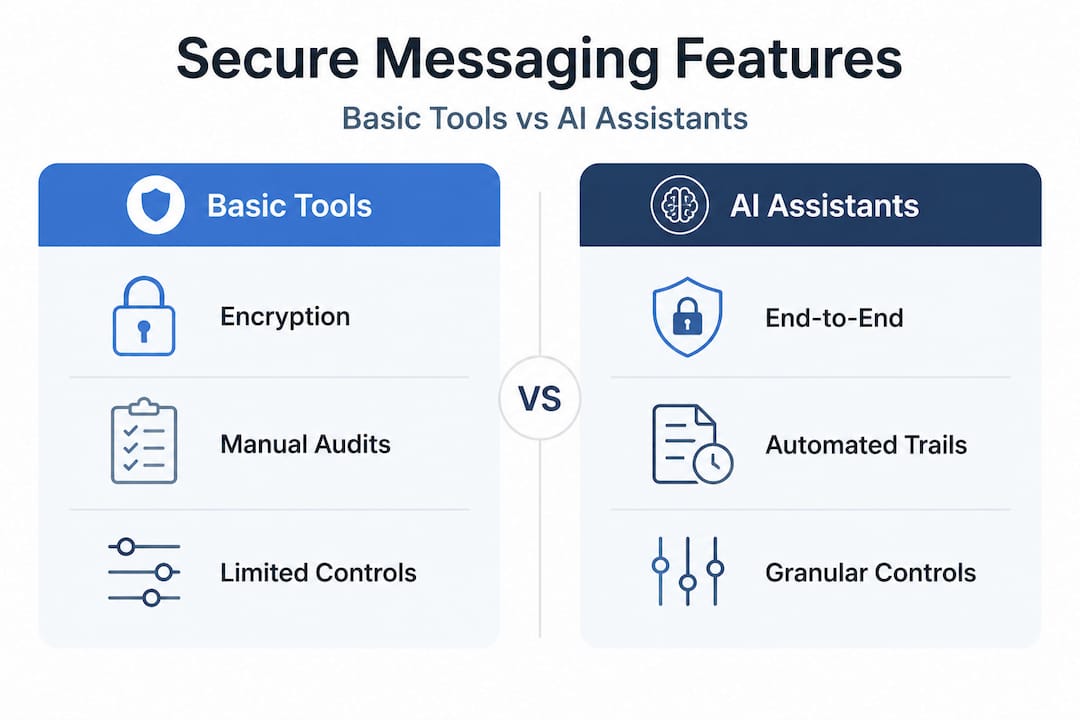
Not every feature marketed as "enterprise-grade" actually is. IT managers need a clear framework for evaluating what matters versus what's window dressing. Here's how to think about the feature set:
Security and compliance essentials:
- End-to-end encryption for all message types, including voice and file transfers
- Data residency options that let you control where information is stored geographically
- Granular audit trails that log who accessed what and when
- Compliance certifications such as SOC 2 Type II, ISO 27001, and HIPAA readiness
- Integration with your existing identity provider (SAML, LDAP, or Active Directory)
Intelligent automation features:
- AI-generated meeting summaries and follow-up task lists
- Smart search that surfaces relevant conversations and documents without exposing restricted content
- Automated escalation workflows for time-sensitive decisions
- Chatbot integrations for IT helpdesk, HR queries, and routine approvals
Integration and extensibility:
- Native connectors to CRM, ERP, and project management tools
- Open APIs that allow your development team to build custom integrations
- Webhook support for real-time data exchange with external systems
User privacy controls:
- Configurable data retention and deletion policies per user or team
- Do-not-record settings for sensitive conversations
- Admin dashboards that give IT full visibility without compromising individual privacy
Forrester's TEI modeling specifically highlights improved IT security as a measurable benefit of investing in enterprise AI assistants, reinforcing that security features aren't just a checkbox, they're a core value driver.

| Feature category | Basic tools | Enterprise AI assistants |
|---|---|---|
| Encryption | In transit only | End-to-end, at rest and in transit |
| Compliance certifications | Limited or none | SOC 2, ISO 27001, HIPAA, GDPR |
| AI automation | None | Summaries, tasks, workflows |
| Audit trails | Basic logs | Granular, exportable, tamper-proof |
| Integration depth | Shallow webhooks | Native connectors plus open APIs |
| User privacy controls | Minimal | Role-based, configurable per team |
Pro Tip: Ask vendors to show you a live demo of their audit trail export. If they can't demonstrate it in under five minutes, that's a red flag about how mature their compliance infrastructure actually is.
For a detailed breakdown of the AI features for secure messaging that matter most for enterprise teams, it's worth reviewing how these capabilities translate into day-to-day workflows. And if you're evaluating whether secure AI messaging can replace your current stack, the integration story is usually where the real complexity lives.
Evaluating vendors and common comparison pitfalls
Before implementation, your success will depend on picking the right platform, yet many procurement teams fall into the same traps repeatedly.
The vendor landscape for AI communication assistants is crowded and moving fast. That creates a specific procurement risk: IT teams often rely on third-party comparison articles or analyst blog posts that are based on assumptions, outdated pricing, or feature lists that don't reflect the current product. This is a costly mistake.
Here's how to approach vendor evaluation with discipline:
- Start with official documentation. Every reputable vendor publishes detailed security whitepapers, compliance certifications, and feature specifications. These are your primary sources. Don't let a third-party blog post substitute for reading the actual security architecture document.
- Use commissioned ROI studies as benchmarks. Studies like Forrester's TEI are methodologically rigorous and give you a credible framework for projecting economic impact. A 408% ROI projection from a commissioned Forrester study carries far more weight than an unverified claim in a vendor's marketing deck.
- Request customer references in your industry. A platform that works well for a tech startup may not meet the compliance requirements of a financial services firm. Ask for references from organizations with similar regulatory profiles.
- Test security claims in your own environment. Proof-of-concept deployments should include a security review by your internal team, not just a vendor-led demo.
- Evaluate total cost of ownership, not just licensing. Integration costs, training, and ongoing administration often exceed the license fee for complex enterprise deployments.
| Evaluation criterion | What to look for | Red flags |
|---|---|---|
| Security certifications | SOC 2 Type II, ISO 27001, HIPAA | Self-certified only, no third-party audits |
| Data residency | Configurable by region | Single-region only, no options |
| Vendor transparency | Published security whitepapers | No documentation available |
| Integration support | Dedicated enterprise support team | Community forums only |
| Pricing clarity | Published tiers or clear enterprise quotes | Opaque pricing, forced bundling |
When choosing AI collaboration tools, the procurement process itself is a signal. Vendors who make it easy to access security documentation and connect you quickly with compliance-focused references are demonstrating the kind of transparency you'll want in a long-term partner. Understanding AI in enterprise communication more broadly also helps you ask better questions during vendor demos.
Implementing an AI communication assistant: Proven steps for success
With a vendor selected, the real work begins: ensuring successful rollout, adoption, and risk management in your organization.
Deployment is where many promising AI initiatives stall. The technology works, but the people and process side gets underestimated. Here's a proven implementation sequence that accounts for both:
- Define your success metrics before you start. Identify what you'll measure: meeting summary accuracy, reduction in follow-up emails, security incidents prevented, time saved per user per week. Without baseline metrics, you can't prove ROI post-rollout.
- Run a structured pilot with a representative group. Choose 20 to 50 users across departments, including at least one team with strict compliance requirements. This surfaces integration issues and security edge cases before they affect the whole organization.
- Conduct an internal security review during the pilot. Your security team should review data flows, encryption behavior, and access controls in your actual environment, not just in vendor documentation. Document findings and resolve them before scaling.
- Build a change management plan. Communicate the "why" to employees clearly. People adopt tools faster when they understand the benefit to them personally, not just the organizational goal. Short training sessions, quick-reference guides, and designated power users in each team all accelerate adoption.
- Phase the rollout by department or function. Start with teams that have the highest communication volume or the most to gain from AI summaries. Use their success stories to build momentum for subsequent phases.
- Establish a feedback loop. Schedule monthly check-ins during the first quarter post-rollout. Collect structured feedback on usability, security concerns, and feature gaps. This data drives continuous improvement.
- Review and report on impact quarterly. Track your pre-defined metrics and report results to leadership. Quantify security events prevented, compliance gaps closed, and productivity improvements. This keeps budget support strong and identifies areas for optimization.
Forrester's TEI research found that organizations that rolled out AI communication tools with structured processes saw improved IT security and stronger risk management outcomes compared to unstructured deployments.
| Implementation phase | Timeline | Key activities |
|---|---|---|
| Pilot | Weeks 1 to 6 | Select users, configure security, gather baseline metrics |
| Security review | Weeks 4 to 8 | Audit data flows, resolve findings, document controls |
| Phased rollout | Months 2 to 4 | Department-by-department deployment, training, feedback |
| Full deployment | Month 5 onward | Organization-wide access, ongoing monitoring, quarterly reviews |
Pro Tip: Assign a dedicated "AI champion" in each department during rollout. This person isn't an IT resource but a peer who can answer day-to-day questions and model good usage habits. Peer influence drives adoption faster than top-down mandates.
For a step-by-step guide to steps to AI-powered collaboration, the operational details of each phase are worth reviewing before you finalize your project plan. If your organization is moving to cloud-based AI messaging, the infrastructure considerations during rollout deserve their own dedicated review.
Why most IT teams underestimate the long-term security impact and how to get it right
There's a pattern we see repeatedly in enterprise AI deployments: the initial business case focuses almost entirely on productivity. Time saved per meeting. Fewer emails. Faster onboarding. These are real and measurable, but they're also the least interesting part of the story from a security standpoint.
The deeper value of a well-chosen AI communication assistant shows up over years, not weeks. When every conversation is encrypted, logged, and subject to consistent retention policies, your organization's overall security posture improves in ways that are genuinely hard to quantify until you need them. A compliance audit that used to take weeks now takes days because the audit trail is clean and exportable. A potential data breach gets caught early because the platform's access controls flagged an anomaly. A regulatory inquiry gets resolved quickly because message records are intact and searchable.
Most IT leaders look at feature checklists during procurement. That's necessary but not sufficient. The real question is: how does this platform change your risk profile over a three to five year horizon? That means asking about the vendor's security roadmap, their history of responding to vulnerabilities, and how they handle data when a customer offboards.
AI's evolving role in team communication is moving fast, and the organizations that treat AI assistants as strategic security infrastructure, not just productivity tools, are the ones that will see compounding returns. The productivity gains are the visible tip of the iceberg. The security and compliance improvements are the mass below the waterline, less visible but far more consequential.
The uncomfortable truth is that most organizations underinvest in measuring these long-term security outcomes. They deploy, they measure short-term adoption, and they move on. The teams that build ongoing measurement frameworks, tracking avoided incidents, compliance audit outcomes, and data governance improvements, are the ones that can make the case for continued investment and continuous improvement year after year.
Explore secure, AI-driven team communication with Luxenger
If the framework above resonates, the next step is finding a platform built specifically to deliver on it. Secure AI communication isn't a feature you add on later. It has to be foundational.

Luxenger is an enterprise messaging solution designed for organizations that need bank-grade security alongside genuinely useful AI features. AI-powered conversation summaries, real-time translation for multilingual teams, and voice huddles are built into the platform, not bolted on as add-ons. Every message is protected with end-to-end encryption, and the compliance architecture is designed to meet the requirements of regulated industries. You can review Luxenger's pricing plans to find the right fit for your organization's size and needs, or explore the full Luxenger platform to see how the security and AI features work together in practice.
Frequently asked questions
How do AI communication assistants improve IT security in enterprises?
They reduce data leakage risk and strengthen compliance through automated monitoring, granular user controls, and deep integration with existing security policies. Enhanced security and compliance are identified as significant, if difficult to quantify, benefits in Forrester's TEI research.
What ROI can I expect from implementing an AI assistant for team communication?
Returns vary by organization, but authoritative benchmarks are strong: Forrester's TEI study projects a 408% ROI and $98.7M NPV for enterprise AI assistant deployments, with security gains adding further unquantified value.
What features should enterprise IT teams prioritize in AI communication platforms?
Security certifications, end-to-end encryption, compliance audit trails, app integrations, and user privacy controls are essential. Forrester's TEI research confirms that improved IT and data security is a core benefit of enterprise AI communication investments.
How can we avoid common pitfalls in evaluating AI assistant vendors?
Base every procurement decision on official product documentation and commissioned studies, not assumptions in third-party comparison articles. Vendor comparison caution is a consistent theme in rigorous ROI research: primary sources protect your organization from costly misalignment.
How long does it take to implement an AI communication assistant across a large team?
Most enterprises should plan for several months from pilot to full deployment, with structured feedback cycles at each phase. Forrester's TEI findings reference phased rollouts as a best practice for achieving both adoption and security outcomes at scale.