

TL;DR:
- Many enterprises struggle with growing helpdesk queues, unapproved app data flow, and delayed decisions without modern communication tools. AI-powered messaging solutions enhance security and efficiency through automated summarization, prioritization, and secure integrations, enabling faster, compliant collaboration. Successful deployment requires strong infrastructure, governance, phased rollout, and ongoing feedback to maintain trust and legal compliance.
Your IT helpdesk ticket queue is growing. A product team in Singapore is waiting for a decision from legal in New York. Meanwhile, sensitive data is flowing through a consumer chat app someone installed without IT approval. This scenario plays out every day in enterprises that haven't modernized their communications stack. AI-powered communication tools solve this through automated summarization, smart prioritization, reply suggestions, and secure API-based integrations that connect your existing systems without creating new risk exposure. The result is faster decisions, fewer bottlenecks, and a measurable reduction in the kind of ad-hoc workarounds that quietly drain productivity and invite compliance disasters.
Table of Contents
- What you need to enable secure AI-powered team communication
- Step-by-step: Deploying AI communication tools and integrations
- Governance, risk, and compliance: Avoiding security pitfalls
- Proving value: Benchmarks, KPIs, and what success looks like
- Our take: What most IT managers miss about AI communication rollouts
- Power your team with secure AI messaging today
- Frequently asked questions
Key Takeaways
| Point | Details |
|---|---|
| Start with secure integration | Use OAuth, SIEM, and DSPM tools for locked-down AI data posture and access. |
| Deploy in phases | Always begin with pilot rollouts and expand only after thorough policy checks. |
| Continuously audit AI agents | Memory policies and quarterly reviews are critical to meet compliance standards. |
| Track team KPIs | Measure improvements in resolution speed, meeting time, and onboarding to prove ROI. |
| Balance AI with oversight | Combine automation with human-in-the-loop for safest, most effective outcomes. |
What you need to enable secure AI-powered team communication
With the opportunity and challenges in mind, let's take stock of what you'll need to launch secure AI-powered messaging.
Before you evaluate any tool or approve a budget request, your infrastructure needs a solid foundation. The two non-negotiables are secure API integration and identity management via OAuth 2.0. OAuth handles authentication between your AI messaging tools and existing enterprise systems, including your HR platform, ticketing system, and cloud storage. Without it, you're either blocking useful integrations or opening unsecured data pathways. On the data governance side, AI tools must integrate securely using APIs and OAuth, while Data Security Posture Management (DSPM) tools manage AI data postures to prevent sensitive data from leaking across system boundaries.
Beyond the infrastructure layer, you need to decide which AI capabilities your team actually needs. The major solution types include:
- AI chatbots and virtual agents: Handle routine IT and HR queries without human intervention
- Summarization agents: Condense long message threads and meeting transcripts into actionable bullet points
- Prioritization bots: Surface urgent messages and flag items that need human review
- SIEM integration: Security Information and Event Management (SIEM) systems log all AI interactions for audit and anomaly detection
- Real-time translation: Enable multilingual teams to communicate without language becoming a bottleneck
Once you've mapped your requirements to solution types, use this checklist to confirm readiness before procurement:
| Readiness area | Requirement | Status check |
|---|---|---|
| Identity and access | OAuth 2.0 configured for all integrations | Verified or pending |
| Data governance | DSPM tool deployed and policies defined | Verified or pending |
| Audit logging | SIEM connected to all AI messaging endpoints | Verified or pending |
| Network security | API traffic routed through enterprise firewall | Verified or pending |
| User training | IT and comms teams briefed on AI tool scope | Verified or pending |
| Pilot scope | Non-sensitive team and use case identified | Verified or pending |
Explore secure AI chat solutions to see how enterprise platforms approach each of these requirements in practice.
Pro Tip: Start your pilot in a team that handles low-sensitivity workloads, like internal events coordination or IT asset management. This gives you real usage data without risking exposure of regulated information during the learning phase.
Getting the prerequisites right is more than a checklist exercise. Enterprises that skip the DSPM step often discover, only during a compliance audit, that their AI tools have been storing conversation metadata in locations outside approved data residency boundaries. That's an expensive lesson. Review secure AI messaging best practices to understand the governance layer before you finalize vendor selection. For a broader view of how different platforms handle these challenges, AI collaboration tools provide useful context on enterprise-grade security features across the market.
Step-by-step: Deploying AI communication tools and integrations
Now that you have your toolkit, here's how to bring AI-powered messaging online in your enterprise.
Deployment is where good intentions meet operational reality. A structured, phased approach protects you from both security exposure and the kind of user resistance that kills adoption. Here's the sequence that works:
-
Define your pilot scope: Choose one team (ideally 15 to 30 users) and one specific use case. IT helpdesk triage or onboarding coordination are strong starting points because both have measurable before-and-after metrics.
-
Configure OAuth and audit logging: Set up OAuth 2.0 connections between your AI messaging platform and core enterprise systems. Simultaneously, route all AI activity logs into your SIEM. Every query, every AI-generated response, and every data access event should be captured.
-
Set persistent memory approval policies: Decide explicitly which conversation contexts the AI is allowed to retain across sessions. Unmanaged persistent memory is one of the most common sources of data leakage in enterprise AI deployments.
-
Onboard the pilot team with structured training: Don't just give users access. Run a 90-minute session covering what the AI can and can't do, how to flag unexpected outputs, and how to escalate edge cases to human reviewers.
-
Monitor for 60 days: Track response accuracy, user adoption rates, security alerts, and any instances where the AI produced outputs that required human correction. Phased rollouts with quarterly audits are best practice for enterprise deployment, and this monitoring window feeds directly into your first audit.
-
Plan and execute full rollout: Use pilot learnings to refine configuration, update training materials, and expand to additional teams in waves.
One detail that separates successful enterprise deployments from troubled ones is the handling of edge cases. Edge cases require hybrid AI-human logic, including input validation, confidence thresholds, and human-in-loop interventions. In practice, this means your AI messaging platform should be configured to escalate automatically when its confidence score for a response falls below a defined threshold, rather than serving a potentially wrong answer to an employee who may act on it.
| Deployment phase | Pilot stage | Full rollout stage |
|---|---|---|
| Team size | 15 to 30 users | Entire organization |
| Use cases | 1 to 2 defined scenarios | All approved workflows |
| Security review | Weekly log reviews | Monthly, with quarterly audit |
| Memory policies | Restricted, non-sensitive only | Full policy suite enforced |
| Human oversight | Daily check-ins with pilot team | Automated alerts plus human review |
| Success criteria | Baseline metrics established | KPI targets met or exceeded |

Review AI-powered communication best practices to see how governance frameworks apply at each phase. For a practical look at how AI team chat solutions handle phased rollouts, the architecture choices made at the pilot stage heavily influence how clean your full deployment will be.
Pro Tip: Schedule your first formal compliance and governance audit at the 90-day mark, not the 180-day mark. Early audits catch configuration drift before it becomes a regulatory issue and give you documented evidence of due diligence if your organization faces a security review.
Governance, risk, and compliance: Avoiding security pitfalls
However, effective deployment requires strong governance and risk controls. Here's what to watch for.
The most dangerous assumption in enterprise AI adoption is that a tool that works well for individual productivity is suitable for team-wide deployment on sensitive data. Consumer chat apps lack enterprise-grade privacy and audit features, and multi-tenant AI architectures introduce risks that require dedicated server isolation to manage properly. When multiple organizations share the same AI infrastructure, the risk of cross-tenant data exposure rises significantly, especially if memory and context retention aren't isolated at the tenant level.
The key risks your governance framework needs to address include:
- Persistent memory leakage: AI tools that retain conversation context across sessions can inadvertently surface information from one conversation in another user's session
- PII handling failures: Personally identifiable information (PII) entered into AI chat interfaces may be logged, retained, or used for model training unless explicitly restricted
- Insecure API connections: OAuth misconfiguration or token management failures can expose your enterprise systems to unauthorized access
- Shadow AI adoption: Employees using unapproved AI tools outside your governed environment, bypassing all controls
- Audit trail gaps: If AI interactions aren't fully logged in your SIEM, you can't demonstrate compliance during a regulatory review
Critical compliance warning for regulated industries: If your organization operates in healthcare, financial services, or government contracting, persistent memory, PII handling, and quarterly audits are not optional features. They are required baseline controls. Deploying AI messaging without these in place exposes your organization to regulatory penalties that dwarf the cost of the tools themselves.
Your security controls checklist should include:
- OAuth 2.0 with token rotation enabled
- SIEM integration with real-time alerting for anomalous AI activity
- Explicit opt-in policies for persistent memory at the user and team level
- PII detection and redaction applied before data reaches AI processing layers
- Role-based access controls (RBAC) limiting which teams can use which AI capabilities
- Regular red-team exercises specifically targeting AI integration points
- Employee reporting channels for unexpected or concerning AI outputs
For deeper coverage of secure AI communication architectures, the design decisions made at the infrastructure level determine how much governance overhead your team carries long-term. Reviewing top AI collaboration tools through a security lens, not just a features lens, is the right starting point for your evaluation.
Proving value: Benchmarks, KPIs, and what success looks like
Once secure, compliant AI-powered messaging is running, you'll want to measure the business impact.
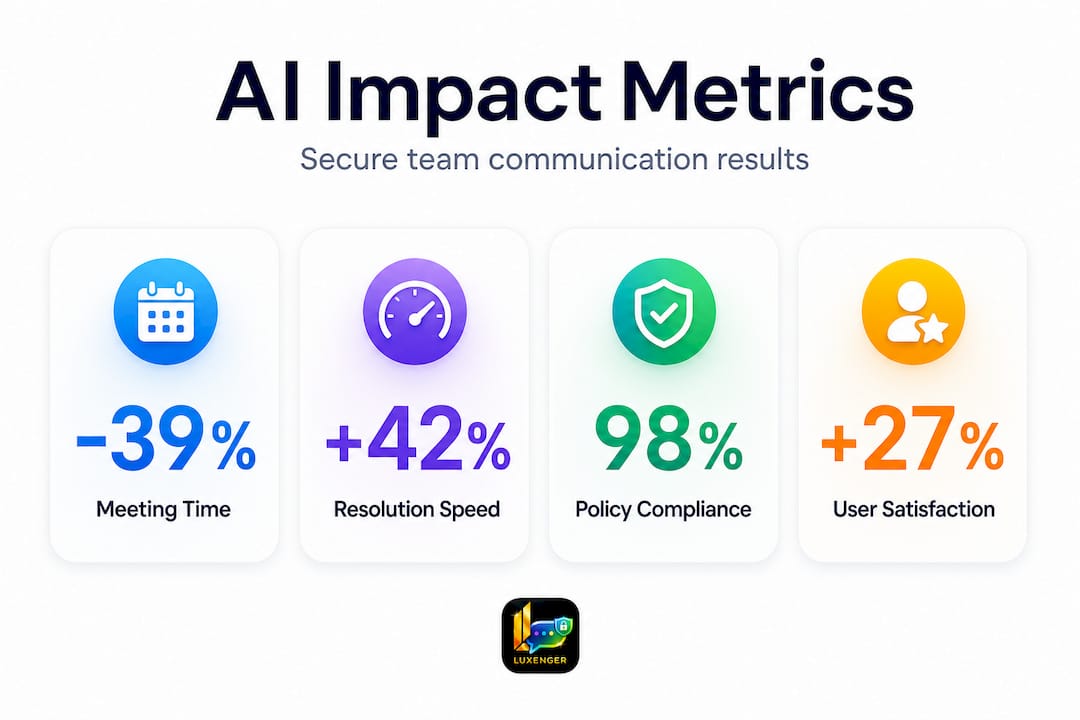
The good news is that the impact of AI-powered communication is well-documented and significant. The better news is that most of the gains show up within the first 90 days of deployment, which means you won't be waiting a year to justify your investment to the CFO.
Here's what the numbers actually look like in practice:
| Metric | Before AI | After AI | Improvement |
|---|---|---|---|
| IT/HR case resolution time | Baseline | Reduced | 30% faster resolution |
| Employee onboarding duration | Baseline | Reduced | 37.5% shorter onboarding cycles |
| Team meeting time | Baseline | Reduced | 39% reduction in meeting hours |
| Session handling via bots | Low | High | 42% of sessions handled without human agents |
| Innovation output | Individual baseline | Team + AI | 3x more top ideas generated |
These figures come from real enterprise deployments across IT, HR, and product teams. The 39% reduction in meeting time alone represents a massive recapture of productive hours in organizations where back-to-back meetings are the norm. If a team of 50 people each spends 8 hours per week in meetings and AI tooling reduces that by 39%, you're recovering roughly 156 hours of productive capacity per week across that single team.
The innovation finding deserves special attention. AI teams consistently outperform individuals for both innovation output and execution speed. This isn't about replacing human judgment. It's about giving your teams a way to process more information, synthesize faster, and spend cognitive energy on decisions rather than information retrieval.
When setting up your measurement framework, track these KPIs from week one:
- Mean time to resolution (MTTR) for IT and HR tickets handled through AI channels
- Onboarding completion rate and time-to-productivity for new hires using AI-assisted workflows
- Meeting volume and duration before and after AI summarization tools are in use
- User adoption rate within the pilot team and each successive rollout wave
- Security incident rate specifically related to AI integrations
Explore AI tool selection benefits to see how different enterprise teams frame their ROI cases. For a broader view of AI impact on enterprise communication in 2026, the productivity gains are accelerating as model quality and integration depth both improve.
Our take: What most IT managers miss about AI communication rollouts
The deployment playbooks rarely discuss what actually makes or breaks these projects. The tools are, at this point, mature enough that technology failure is rarely the cause of a failed rollout. The real failure modes are cultural.
The first mistake is over-automation. When you automate too aggressively too early, you remove the human touchpoints that give employees confidence in the system. A bot that confidently answers a sensitive HR question incorrectly, with no human escalation path in sight, destroys trust faster than any security incident. The lesson is simple: automate the repetitive, but keep humans visible in the loop for anything that affects someone's work life directly.
The second mistake is governance fatigue. IT and compliance teams correctly implement strong controls at launch. But then the quarterly audits get deprioritized. Memory policies that were reviewed in the first month haven't been touched in a year. New team members get AI access without the training the original pilot cohort received. This is how compliant deployments become non-compliant ones without anyone noticing.
The third mistake is ignoring feedback loops. Your employees using these tools every day will identify failure modes, awkward edge cases, and missing capabilities faster than any internal testing team. Set up a structured channel, not just a general feedback form, for reporting AI tool issues and ideas. Then actually act on that feedback visibly, so users see their input reflected in updates.
The organizations that sustain the productivity gains shown in the benchmarks above are the ones that treat AI communication as an ongoing practice rather than a one-time deployment. That means a named owner for the AI communications program, a regular review cadence, and a clear process for onboarding new capabilities. For practical guidance on managing AI communication assistants as a long-term organizational capability, the governance dimension is where the most experienced practitioners spend their time.
Culture change is slow. The tool rollout is fast. Your job as an IT or communications manager is to pace the change so users build trust in the system while governance keeps pace with expanding use.
Power your team with secure AI messaging today
If you're ready to accelerate secure team communication, here's how Luxenger can help.
Luxenger is built specifically for enterprises that can't afford to compromise on security or productivity. With bank-grade encryption, AI-powered conversation summaries, real-time multilingual translation, and voice huddle capabilities, the platform gives your teams everything they need without the compliance risk that comes with consumer-grade tools.
Whether you're evaluating secure business messaging for a regulated industry or looking to consolidate a fragmented communications stack, Luxenger fits into your existing infrastructure through secure API and OAuth integrations. Start with a tailored deployment consultation to map your specific requirements, pilot scope, and governance needs. Visit luxenger.com to explore the platform, and see pricing options that scale with your organization's size and compliance requirements.
Frequently asked questions
How does AI in team communication boost productivity?
AI tools automate routine tasks, accelerate case resolution, and reduce time spent in meetings, with documented outcomes including up to 44% faster task completion across IT, HR, and project workflows.
What are the biggest risks when deploying AI messaging in enterprises?
The primary risks are data leaks through unmanaged persistent AI memory, insecure API integration, and multi-tenant data exposure. Regulated sectors require strict governance controls including PII handling policies and quarterly audits as baseline requirements.
How do I start integrating AI communication tools into my company's workflow?
Begin with a pilot in a non-sensitive team, configure OAuth and SIEM integration before going live, and expand to broader teams only after a 90-day audit confirms secure and stable operation.
Can AI-powered chat solutions handle confidential or regulated data?
Yes, with the right configuration. Properly configured approval policies, persistent memory audits, and dedicated server isolation make AI messaging viable for sensitive and regulated environments, but these controls must be implemented before deployment, not added later.