

TL;DR:
- Deploying AI improves individual productivity but doesn't automatically fix team communication dynamics.
- Security measures like permissions, DLP, and audit logging are essential for responsible AI messaging.
- Successful AI collaboration requires clear policies, human oversight, ongoing training, and organizational change.
Enterprises are discovering a frustrating reality: deploying AI tools does not automatically fix the way teams communicate. The promise of instant clarity and seamless collaboration sounds compelling, but AI accelerates individual tasks more reliably than it resolves deeper team dynamics. For IT and communications managers, this distinction matters enormously. Budget approvals, compliance audits, and employee trust all hinge on whether your AI messaging investment genuinely improves outcomes, or simply creates new complexity. This guide gives you a practical framework for deploying AI team communication in a way that is secure, measurable, and built to last beyond the initial rollout excitement.
Table of Contents
- What is AI team communication and why does it matter?
- Security and compliance fundamentals for AI messaging
- Common barriers to successful AI team communication
- Best practices for deploying secure, effective AI team messaging
- A realistic view: Why secure AI team communication is still a human challenge
- Take the next step: Secure your enterprise AI messaging with Luxenger
- Frequently asked questions
Key Takeaways
| Point | Details |
|---|---|
| AI boosts productivity | AI enhances individual and team efficiency, but doesn't automatically resolve culture or clarity challenges. |
| Security must come first | Admins need to implement detailed controls, policies, and audits when deploying enterprise AI messaging. |
| Culture is critical | Lasting improvements depend on human escalation, teamwork, and clear policy—not just technology. |
| Apply best practices | Drive value from AI by combining technical guardrails with ongoing training and review. |
What is AI team communication and why does it matter?
AI team communication refers to the practice of embedding artificial intelligence directly into your organization's messaging workflows. This goes well beyond spell-check or smart replies. Modern AI communication tools can assign tasks automatically based on conversation context, generate concise summaries of long threads, surface relevant documents mid-conversation, and route messages to the right people based on topic or urgency.
The AI-powered communication guide for enterprises breaks this into three layers: automation (AI bots performing repetitive messaging tasks), augmentation (AI enhancing human-written messages with context or corrections), and insight (AI analyzing communication patterns to surface bottlenecks or trends). Each layer carries distinct security implications and requires a different level of governance.
Here is what's driving adoption at scale:
- Speed: AI can draft meeting recaps in seconds instead of the 20 to 30 minutes a team member would spend
- Accuracy: Permission-scoped AI agents surface only the information a user is authorized to see, reducing the risk of accidental data exposure
- Cognitive load reduction: Instead of reading 300 messages after a day of meetings, team members review a structured AI-generated summary
- Consistency: AI-driven templates enforce communication standards across global teams regardless of time zone or language
Exploring the full range of key AI features shows just how varied these capabilities have become. But speed and convenience mask a deeper problem. Organizations that treat AI as a silver bullet often find that the same communication failures resurface within months. A poorly structured team does not become well-coordinated because messages arrive faster.
"AI tools can boost productivity, but they often face limits resolving collaboration issues that are rooted in organizational culture, unclear accountability, or fragmented workflows."
Understanding this boundary is what separates IT managers who drive lasting change from those who cycle through tool after tool searching for the fix that policy and leadership should provide. Responsible AI tool adoption means combining technology with training programs, clear communication policies, and defined success metrics from day one.
Security and compliance fundamentals for AI messaging
While the benefits are clear, security and compliance form the non-negotiable foundation for responsible AI communication. Rushing past this layer is where most enterprise AI rollouts create their biggest liabilities.
The fundamental security requirements for any enterprise AI messaging deployment include:
- Identity and permissions: Every AI agent must operate within the permission boundaries of the user it serves. If a team member cannot access a document, the AI summarizing their conversation cannot reference that document either.
- Device compliance: AI messaging tools should enforce conditional access, ensuring that only compliant, managed devices can trigger AI features that involve sensitive data.
- Data loss prevention (DLP): AI-generated content must be subject to the same DLP policies as human-authored content. This means blocking sensitive data types from appearing in summaries, drafts, or suggestions.
- Sensitivity labels: Content classified as confidential or restricted must carry those labels through any AI processing pipeline, preserving their restrictions in the output.
The table below maps these controls to the specific compliance outcomes they support:
| Security control | What it protects | Compliance outcome |
|---|---|---|
| Identity and permissions | Access to sensitive data | Role-based data exposure prevention |
| Device compliance | Endpoint integrity | Audit-ready endpoint management |
| Data loss prevention | Confidential content | Regulatory violation prevention |
| Sensitivity labels | Classified information | Label inheritance through AI outputs |
| Audit logging | All AI interactions | eDiscovery and forensic readiness |
| Retention policies | Message history | Legal hold and data governance compliance |
Microsoft 365 Copilot applies existing user identity, permissions, and sensitivity labels with encryption and audit controls, making it a useful reference point for how enterprise-grade AI should behave by default. Crucially, admins can enforce access controls, audit logs, data loss prevention, and eDiscovery across both Copilot and Teams, meaning IT managers retain full visibility into what the AI is doing with team data.
Pro Tip: Before you activate any AI messaging feature, map every content type it will touch against your existing DLP and retention policies. Gaps discovered during an audit are far more costly than gaps discovered during configuration.
Reviewing how organizations are approaching secure AI collaboration tools reveals that the highest-performing deployments treat security configuration as an ongoing practice, not a one-time setup. Quarterly policy reviews tied to audit log analysis are becoming standard among enterprises that operate in regulated industries like finance and healthcare.

Common barriers to successful AI team communication
Having examined the foundational security layer, it is crucial to acknowledge what often prevents AI communication projects from achieving their goals. The technology rarely fails on its own terms. It is the organizational context around the technology that determines whether AI becomes a genuine asset or an expensive distraction.
Clarity issues are more prevalent than most vendors admit. AI-generated messages optimize for coherence and brevity but can strip out the nuance that gives communication its meaning in team contexts. A summary that misses the emotional tone of a difficult negotiation, or a bot-drafted update that omits the "why" behind a decision, can create more confusion than the original thread it was supposed to simplify.
Consider what AI communication clarity research reveals:
"AI agents may need escalation or 'ask for help' mechanisms when communication tasks exceed their confidence thresholds. Without these, ambiguous instructions can cascade into downstream errors across an entire team workflow."
This is not a theoretical concern. When an AI agent misinterprets a project manager's shorthand and routes a task incorrectly, the team discovers the error hours or days later. Without a built-in escalation path, the agent simply proceeds with confidence.
The most commonly observed barriers include:
- Cultural resistance: Team members who feel surveilled or replaced by AI are less likely to engage authentically in AI-assisted channels
- Accountability gaps: When an AI sends a message or assigns a task, it can be unclear who owns the outcome if something goes wrong
- Over-reliance: Teams that stop reading full threads because "the AI will summarize it" often miss context that changes decision-making
- Fragmented adoption: When only some departments use AI features, communication between AI-assisted and non-AI teams creates friction and inconsistency
The critical insight, backed by longitudinal research, is that AI in practice accelerates individual productivity rather than fixing collaboration gaps at the team level. This is not a reason to avoid AI communication tools. It is a reason to be intentional about what problems you expect them to solve. Addressing overcoming AI communication issues requires pairing technology with process redesign, not just feature activation.
Understanding AI transformation challenges at the enterprise level makes clear that the organizations seeing the best results are those that invested in change management alongside their technology budgets.
Best practices for deploying secure, effective AI team messaging
With barriers addressed, success hinges on implementing the right mix of technology, policy, and organizational process. The following framework is built specifically for IT and communications managers overseeing medium to large enterprise environments.
Step 1: Draft explicit AI content policies before launch
Define exactly what content AI agents are permitted to process, summarize, and act on. This is not just a security exercise. It shapes employee trust. Admin-gated features and permission-scoped agent behavior must be paired with policies on what content AI agents can use for summaries or actions. Without this document, your security configuration and your employee expectations will eventually conflict.
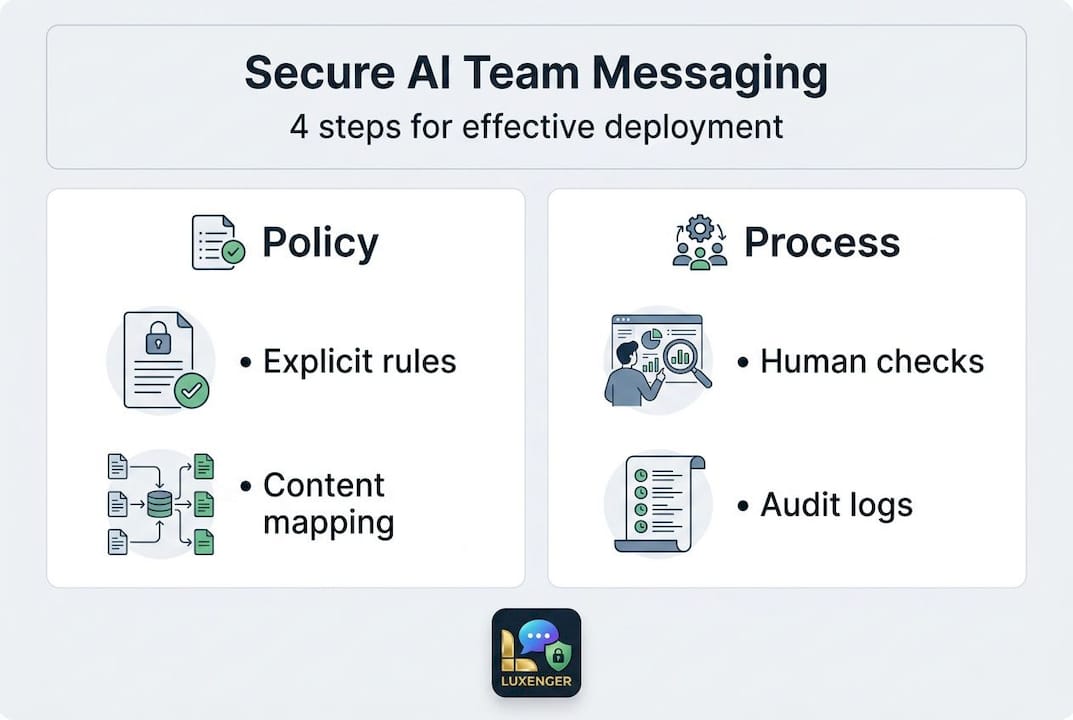
Step 2: Implement human-in-the-loop checkpoints
For any AI action that triggers external communication, task assignment, or document sharing, require a human approval step. This is especially important during the first 90 days of deployment, when the AI model is still being calibrated to your team's communication patterns.
Step 3: Train both technical and non-technical stakeholders
IT managers often focus entirely on the admin layer. But the employees using AI features daily shape how those features perform over time. Invest in short, role-specific training that explains what the AI does, what it cannot do, and when to override it.
Step 4: Use audit logs for adaptive compliance
Treat your audit logs as a learning tool, not just a compliance record. Monthly reviews of AI interactions can reveal patterns: recurring escalation failures, sensitivity label gaps, or DLP triggers that indicate employees are trying to use AI in ways your policy does not yet support.
| Guardrail type | Strength | Limitation |
|---|---|---|
| Admin controls | Consistent enforcement across all users | May lag behind new use cases |
| User training | Builds judgment and trust | Inconsistent without reinforcement |
| Escalation protocols | Catches edge cases AI cannot resolve | Requires clear ownership assignment |
| Audit-driven review | Surfaces real behavior patterns | Requires dedicated review time |
Understanding how AI summaries improve team productivity shows that the highest gains come when employees trust the summaries enough to act on them quickly. That trust is built through policy transparency, not just technical accuracy.
Pro Tip: Document every policy exception in your first six months. These exceptions are your roadmap for what to automate or restrict in the next policy revision cycle.
Following clear steps for AI collaboration means building a feedback loop between your admin configuration, your user behavior data, and your policy team. The organizations that treat this as a living system outperform those that treat AI deployment as a one-time project.
A realistic view: Why secure AI team communication is still a human challenge
Most guides on AI team communication end with a technology checklist. This one ends with a harder question: what happens when the checklist is complete and the results still disappoint?
The uncomfortable truth is that AI often accelerates tasks instead of fixing the underlying communication and culture problems that slow enterprises down. A team with poor accountability structures will use AI to send confused messages faster. A culture that punishes transparency will use AI-generated summaries to obscure information more efficiently.
What actually works, based on where we see lasting improvement, is the combination of three elements: transparent guidelines that employees helped shape, learning cycles built into the quarterly review process, and feedback mechanisms that let frontline workers flag when AI is creating confusion rather than reducing it.
The enterprise AI communication revolution is real, but it is not automatic. Technology creates the conditions for better communication. Human leadership, clear expectations, and organizational accountability are what deliver it. IT and communications managers who internalize this distinction become strategic assets to their organizations, not just tool deployers.
Take the next step: Secure your enterprise AI messaging with Luxenger
Building a secure, AI-powered communication environment takes the right platform and the right partner. Luxenger is built specifically for enterprises that need bank-grade security, smart AI features, and seamless integration with existing compliance frameworks.

Luxenger for enterprise operations brings together AI-powered summaries, real-time translation, voice huddles, and rigorous data protection in a single platform designed to meet the demands of IT and communications managers who cannot afford gaps in security or clarity. Whether your team is comparing modern enterprise messaging platforms or ready to move forward, Luxenger gives you the controls, the visibility, and the AI intelligence your teams need. Review enterprise messaging pricing and take the next step toward communication that is both smarter and safer.
Frequently asked questions
How do AI agents handle sensitive team data?
Modern AI platforms enforce permissions, encryption, and audit controls aligned with enterprise policies to protect sensitive information. Microsoft 365 Copilot applies existing user identity, permissions, and sensitivity labels with full encryption, ensuring AI never surfaces data beyond a user's authorized access level.
What's the most common failure point in AI-powered team communication?
Clarity and escalation are the most frequent failure points. AI agents may need escalation or explicit "ask for help" mechanisms when they encounter ambiguous instructions, and without those mechanisms, errors can propagate silently through workflows.
Do AI tools automatically improve team collaboration outcomes?
Not always. AI accelerates individual tasks reliably but often leaves deeper team culture and accountability challenges unchanged, which is why organizational process design must accompany any technology deployment.
How should enterprises set policies for AI team messages and summaries?
Define permitted content types clearly from the start and document what AI is authorized to use for drafting, searching, or summarizing. Admin-gated features and permission-scoped agents must be paired with written policies that employees can understand and act on consistently.