

TL;DR:
- Poor workplace messaging costs companies millions annually in lost productivity and increased compliance risks.
- Implementing clear policies, structured channels, robust security, and ongoing AI-driven optimization can significantly improve communication.
- Cultural discipline by leadership is essential to sustain effective messaging practices beyond just technology solutions.
Poor workplace messaging isn't just annoying. It's expensive. Poor communication costs large companies $62.4 million a year in lost productivity, and that number doesn't account for the security incidents, missed deadlines, and burned-out employees that come with it. If your teams are drowning in notifications, juggling five different tools, and still missing critical updates, the problem isn't effort. It's structure. This guide walks IT and communications managers through a proven sequence: diagnose what's broken, set clear policies, lock down security, and use AI to keep improving. Every step is actionable and built for enterprise scale.
Table of Contents
- Diagnose your current messaging challenges
- Set clear communication policies and organize channels
- Implement robust security across all messaging tools
- Continuously optimize with audits and AI-powered enhancements
- Our perspective: The biggest barrier isn't tech—it's disciplined digital culture
- Ready to transform your workplace messaging?
- Frequently asked questions
Key Takeaways
| Point | Details |
|---|---|
| Identify bottlenecks | Start by auditing current messaging tools, channels, and pain points to see where communication breaks down. |
| Set clear norms | Write and enforce guidelines for how, when, and where teams should communicate to reduce overload and confusion. |
| Prioritize security | Enable MFA, encryption, and compliance features in every messaging tool to protect data and meet regulatory requirements. |
| Embrace ongoing audits | Regularly review and update your messaging environment using both human and AI-powered insights for continuous improvement. |
| Culture trumps tools | The most advanced technology only works if your team consistently follows best practices and norms. |
Diagnose your current messaging challenges
Let's start by pinpointing exactly where your organization's messaging is falling short. Most enterprise messaging problems fall into four categories: tool sprawl, information loss, compliance risk, and employee burnout. You probably recognize at least two of them.
Tool sprawl happens when teams adopt new apps faster than IT can govern them. Someone uses Slack for one project, Teams for another, and WhatsApp for a third. Each tool becomes a silo, and critical context gets lost between them. Teams waste an average of 2.5 hours daily switching between communication tools and searching for information, while well-organized teams complete projects 23% faster. That gap is entirely recoverable with the right structure.
Information loss is subtler. It shows up as repeated questions, missed announcements, and decisions that nobody can trace back to a source. Compliance risk compounds this: unarchived messages, unencrypted channels, and shadow IT tools create audit gaps that can expose your organization to serious regulatory consequences. For a deeper look at what's at stake, enterprise messaging security best practices outlines the specific vulnerabilities most organizations overlook.
Burnout is the human cost. More than a quarter of employees and 38% of managers report feeling overwhelmed by excessive communication. When people feel buried, they start ignoring messages, which defeats the entire purpose of having a messaging platform.
How to quantify your pain points:
- Survey teams with five targeted questions about tool usage, response delays, and message clarity
- Pull usage reports from each platform to identify overlap and redundancy
- Track how many tools each department uses for internal communication
- Log the number of "did you see my message?" follow-ups in a given week
- Review any recent compliance incidents tied to messaging channels
| Metric | Disorganized teams | Well-organized teams |
|---|---|---|
| Hours lost daily to tool switching | 2.5 hours | Under 30 minutes |
| Project completion speed | Baseline | 23% faster |
| Employee satisfaction | Lower | 35% higher |
| Compliance incident rate | Higher | Significantly reduced |
Pro Tip: Run a one-week messaging audit before making any platform or policy changes. Ask five people from different departments to log every tool they use and every time they can't find information they need. The patterns will tell you exactly where to start.
Set clear communication policies and organize channels
With challenges mapped, the next step is design: streamlining how your team actually communicates. Structure without policy is just noise with better labels. You need both.
Written communication guidelines remove ambiguity. Teams with clear chat guidelines report 40% fewer misunderstandings and project delays, along with 35% higher job satisfaction. Those are significant gains from something as simple as a shared document that explains what goes where.
Here's a practical framework for organizing channels:
- Define channel purposes explicitly. Every channel should have a pinned description explaining its scope, who can post, and what belongs there.
- Use consistent naming conventions. Prefix tags like [URGENT], [FYI], or [ACTION] help recipients triage without opening every message.
- Separate announcements from discussion. One-way broadcast channels prevent important updates from getting buried in back-and-forth replies.
- Establish response time expectations (SLAs). Publish clear norms: urgent messages get a response within one hour, standard requests within one business day.
- Archive or delete stale channels quarterly. Channel clutter is as damaging as message clutter.
| Channel type | Primary purpose | Posting rules |
|---|---|---|
| Announcements | Company-wide updates | Admins only |
| Project channels | Task coordination | Team members, threaded replies |
| Department channels | Team discussion | Open posting, stay on topic |
| Direct messages | 1:1 or small group | Informal, time-sensitive |
| Threads | Contextual replies | Nested under parent message |
Implementing clear communication guidelines with priority prefixes and response time expectations is one of the highest-leverage changes any organization can make. It costs nothing and pays back immediately in reduced confusion.
For teams working across locations, remote team communication tips offers additional structure for asynchronous environments where time zones add another layer of complexity.
Pro Tip: Create a short message template library for your most common communication types: project kickoffs, status updates, escalation requests. Templates reduce cognitive load and keep messages consistent across the team.
Implement robust security across all messaging tools
Even the best policies fail if security is an afterthought. Here's how to make safety foundational, not a checkbox you revisit after an incident.

Enterprise messaging security starts with the controls your platform supports. Prioritize end-to-end encryption, MFA, role-based access, DLP, and compliance with GDPR and HIPAA in any messaging platform you evaluate or currently run. These aren't optional features for enterprises handling sensitive data. They're the baseline.
Beyond the basics, your identity and access management layer matters enormously. Use SSO/SAML, SCIM, audit logs connected to your SIEM, and Enterprise Key Management to maintain control over who accesses what and when. SSO reduces credential sprawl. SCIM automates user provisioning and deprovisioning, which is critical when employees leave or change roles. Audit logs give you the forensic trail you need for compliance reporting.
Security checklist for enterprise messaging platforms:
- End-to-end encryption for all messages and file transfers
- Multi-factor authentication enforced organization-wide
- Role-based access controls with least-privilege defaults
- Data loss prevention (DLP) policies to block sensitive data sharing
- SSO/SAML integration with your identity provider
- SCIM for automated user lifecycle management
- Audit logging connected to your SIEM
- Compliance certifications relevant to your industry (HIPAA, GDPR, SOC 2)
- Remote wipe capability for mobile devices
- Retention and archiving policies that meet regulatory requirements
For a detailed breakdown of what to look for when evaluating platforms, secure messaging features covers the must-have capabilities in 2026. And if you're building a broader data protection strategy, master data security provides an enterprise-grade framework worth reviewing.
Pro Tip: Schedule quarterly security reviews tied directly to your compliance reporting calendar. When security reviews are connected to a business deadline, they actually happen. Treat them like financial audits, not optional maintenance.
Continuously optimize with audits and AI-powered enhancements
Once safeguards and structures are in place, shift your focus to ongoing improvement and harness technology momentum. Static policies decay. What worked six months ago may be creating friction today.
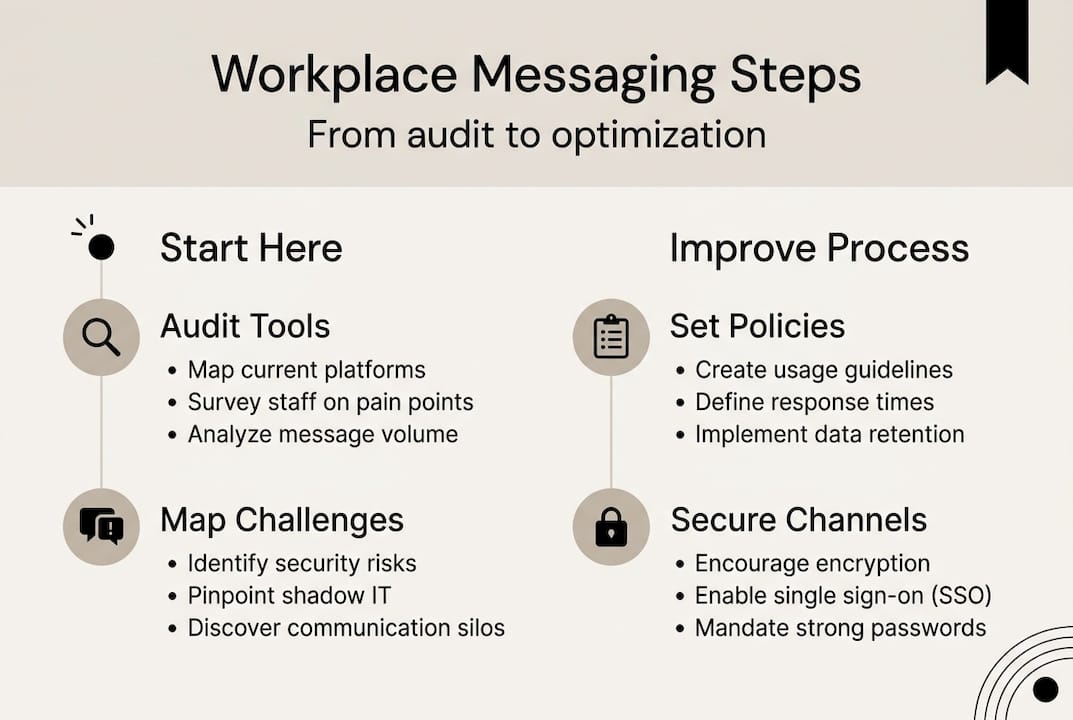
Quarterly messaging audits are your primary feedback mechanism. Optimize channels, enhance relevance through audits, cross-functional governance, and skills development to combat overload over time. The goal isn't to find problems. It's to find drift before it becomes a crisis.
Here's a structured audit process:
- Review channel activity. Flag channels with no posts in 30 days for archiving or consolidation.
- Survey active users. Ask what information is hardest to find and which channels feel redundant.
- Analyze message volume trends. Spikes often signal policy gaps or unclear ownership.
- Check access controls. Verify that departed employees have been fully deprovisioned.
- Evaluate AI tool performance. Are summaries accurate? Are filters reducing noise effectively?
AI is where the biggest efficiency gains are now emerging. Microsoft 365 Copilot saves end users 25 hours per year on meetings and reduces meeting time by 38 to 63 hours annually. That's not a marginal improvement. That's weeks of recovered capacity per employee.
AI-powered features worth deploying now include:
- Conversation summaries that catch up late joiners without requiring them to scroll through hundreds of messages
- Smart notifications that surface only the messages requiring your attention
- Real-time translation for multilingual teams, removing friction from global collaboration
- Meeting recaps that extract action items automatically
For a step-by-step approach to building these capabilities into your workflows, messaging workflow steps provides a practical implementation path.
Our perspective: The biggest barrier isn't tech—it's disciplined digital culture
Let's step back from tools and technology to reflect on what really moves the needle. We've worked with organizations that have invested heavily in enterprise platforms, only to see the same chaos persist six months later. The tools weren't the problem. The habits were.
Most organizations already have solid technology. What they lack is consistent enforcement of the norms that make technology effective. A channel structure no one follows is just decoration. An MFA policy with exceptions for senior executives is a vulnerability, not a safeguard.
Sustained improvement comes from leaders who model the behavior they expect. That means using threads instead of top-level messages when replying. It means respecting response time SLAs. It means calling out policy drift in team retrospectives rather than letting it slide.
The organizations that see lasting results from messaging improvements aren't the ones with the newest tools. They're the ones where a manager notices when a channel is being misused and says something. Choosing integrated messaging for security is a smart start, but the real competitive advantage is a team that actually uses it the right way, consistently.
Technology enables. Culture sustains.
Ready to transform your workplace messaging?
If you're ready to bring these strategies to your team, explore solutions purpose-built for modern enterprise needs. Luxenger is built specifically for organizations that can't afford to compromise on security or efficiency.

The Luxenger enterprise messaging platform combines bank-grade encryption, MFA, role-based access, and HIPAA and GDPR compliance with AI-powered conversation summaries, real-time translation, and voice huddles. It's designed to replace the fragmented tool stack with one secure, intelligent environment. Explore the full enterprise messaging platform to see how it fits your organization's structure, or review messaging pricing options to find the right plan for your team size and compliance requirements.
Frequently asked questions
What are the most common workplace messaging mistakes?
The most common mistakes are unclear channels, missing guidelines, and weak security settings. Teams with clear guidelines report 40% fewer misunderstandings, which shows how much structure alone can change outcomes.
How often should messaging audits be performed?
Perform organization-wide messaging audits quarterly to catch overload, redundancy, and security gaps before they spread. Audits combined with cross-functional governance are among the most effective tools for combating long-term communication overload.
Which security features are essential for enterprise messaging?
Enterprises need end-to-end encryption, MFA, DLP, SSO/SAML, audit logging, and strict access controls. End-to-end encryption and role-based access are the non-negotiable starting points for any regulated industry.
How can AI tools help improve workplace messaging?
AI can summarize threads, automate meeting recaps, and filter notifications so employees focus on what matters. Copilot in Teams saves end users 25 hours per year on meetings, a measurable return that justifies AI investment quickly.