

TL;DR:
- Remote enterprise teams face overload from scattered tools and unstructured communication, leading to inefficiency.
- Effective workflows require simplifying tools, establishing clear norms, and balancing asynchronous with synchronous communication.
Remote enterprise teams are drowning in notifications, switching between a dozen apps, and losing critical decisions to scattered chat threads. Endless meetings replace the casual office exchange that once kept projects aligned, and without a deliberate structure, centralizing work and communication becomes the only reliable antidote to always-on fatigue. This guide cuts through the noise and gives team leaders and project managers a practical, step-by-step framework for building remote workflows that are faster, clearer, and secure enough for enterprise-grade demands.
Table of Contents
- Assess your current workflow and communication stack
- Define clear team communication and workflow expectations
- Centralize coordination through unified platforms
- Balance asynchronous and synchronous work for clarity and productivity
- Build a culture of trust and ongoing improvement
- Why most remote workflow advice gets it backwards
- Take your remote workflow to the next level with secure enterprise messaging
- Frequently asked questions
Key Takeaways
| Point | Details |
|---|---|
| Centralize tools | Fewer platforms reduce confusion, fatigue, and security risk for remote teams. |
| Set clear expectations | Define communication channels, response norms, and meeting protocols up front. |
| Prioritize async-first | Favor asynchronous work with structured live touchpoints and thorough documentation. |
| Review workflows regularly | Schedule ongoing improvement cycles and open feedback to keep workflows efficient. |
| Trust drives productivity | Building a cooperative, trusting culture boosts engagement and output in remote environments. |
Assess your current workflow and communication stack
Before you redesign anything, you need an honest picture of where your team stands today. Most organizations accumulate tools the way offices accumulate old furniture: one at a time, for good reasons that no longer apply. The result is a sprawling stack that nobody fully understands.
Signs your workflow is too complex:
- Team members use more than five apps for daily communication and task tracking
- Critical decisions get made in email threads that half the team never sees
- Onboarding new hires takes weeks just to explain which tool to use when
- IT raises security concerns about shadow apps employees adopted without approval
- People frequently say "I didn't see that message" even though it was sent
Tool overload is rarely caused by lazy teams. It's caused by departments solving problems independently, streamlining tools and consolidating communication being treated as optional rather than strategic. Each new app creates a new silo, and silos multiply miscommunication.
| Workflow type | Apps in use | Avg. daily context switches | Security visibility |
|---|---|---|---|
| Complex/fragmented | 8 to 12 | 15 or more | Low |
| Streamlined | 3 to 5 | 5 to 8 | High |
| Optimized | 2 to 3 | 3 to 5 | Full |
Use this table as a benchmark, not a verdict. If your team sits in the fragmented column, that's where you start. Gather data by surveying team leads, reviewing your IT asset list, and pulling usage logs from your current platforms. Understanding your remote team communication tips baseline is the foundation for everything else.
Pro Tip: Loop in your IT and security teams during the audit phase, not after you've already chosen replacement tools. They'll flag compliance gaps, data residency requirements, and integration limits that could derail your rollout later. Their early involvement also speeds up procurement and approval timelines significantly.
Look at improving workplace messaging as a strategic initiative, not a technology swap. The goal of this audit isn't to justify buying something new. It's to understand what you actually need versus what you have.
Define clear team communication and workflow expectations
Once you know what's broken, the temptation is to fix the tools first. Resist it. The bigger problem in most remote teams isn't which app they use; it's that nobody agreed on how to use any app in the first place.
When teams work in the same office, informal cues fill communication gaps. A glance across the room, a hallway question, the tone of someone's voice: all of these carry information. Remote work strips those signals away. Without explicit norms to replace them, setting communication expectations becomes the single most important thing a leader can do to prevent misalignment.
"Teams that implement explicit communication expectations see fewer misunderstandings, faster decision-making, and stronger cross-functional alignment." — Coursera, Managing Remote Teams
Here's a practical step-by-step for defining and rolling out new team standards:
- Identify your communication channels by purpose. Urgent operational issues go to a dedicated channel. Project updates stay in project-specific threads. Social conversation has its own space. Cross-functional requests follow a clear intake process.
- Set response time expectations by channel type. Synchronous channels like voice calls carry a real-time expectation. Async messaging channels like threaded updates carry a 4 to 8 hour response window during working hours. Document this clearly.
- Define meeting norms. Every meeting needs an agenda sent at least 24 hours in advance. Decisions made in meetings are documented and shared within two hours. Recurring meetings are audited quarterly to confirm they still serve a purpose.
- Establish documentation standards. Where do project decisions live? Who owns the knowledge base? How long are records kept? These aren't glamorous questions, but they determine whether institutional knowledge survives turnover.
- Roll out with a kickoff session, not a policy document. Walk the team through the new standards live. Explain the why behind each rule. Invite questions. A policy nobody reads changes nothing.
- Review norms every quarter. What worked in January may create friction by April. Build in structured check-ins to evolve expectations as your team grows and changes.
Building a strong effective communication tips culture is what turns these steps from a one-time exercise into a self-sustaining system. And investing in building async communication culture early pays dividends when the team scales.
Pro Tip: Document every norm in a shared, searchable knowledge base the day it's agreed upon. Memory fades and team membership changes. Written standards are the only kind that persist reliably through growth and turnover.
Centralize coordination through unified platforms
With clear expectations in place, the next practical move is to reduce the number of platforms your team uses. Not just to simplify, but to create the visibility that remote work demands.

Remote work tools that centralize workflows reduce the need to be always online and make team progress visible without requiring everyone to be in the same meeting. When your task updates, project status, and team messaging all live in the same environment, managers spend less time chasing status and more time removing blockers.
| Approach | Tool count | Information visibility | Security risk | Team fatigue |
|---|---|---|---|---|
| Fragmented stack | 8 or more | Low: siloed | High: multiple attack surfaces | High: constant switching |
| Centralized platform | 2 to 3 | High: unified | Low: fewer integrations | Low: single workflow |
When evaluating which platforms to keep or adopt, prioritize these features:
- Bank-grade security with end-to-end encryption and role-based access controls
- Async and sync support in a single environment so teams don't need a separate tool for each mode
- AI-powered features like automated summaries, smart search, and real-time translation for multilingual teams
- Audit logs and compliance reporting to satisfy enterprise security and legal requirements
- Reliability with a strong SLA because downtime in a remote environment is far more disruptive than in an office
An AI-powered collaboration guide walks through exactly why AI features are now table stakes for enterprise teams, not a premium add-on. Features like AI-generated meeting summaries and thread digests save hours of reading time each week across large organizations.
Consolidation also shrinks your IT and security surface area. Every app your team uses is a potential vulnerability, an additional vendor to manage, and a new system to train people on. Choosing secure remote work channels and reducing your platform count is a security decision as much as a productivity one. For teams evaluating options, a direct comparison of best business team chat apps highlights what separates enterprise-grade solutions from consumer tools.
Balance asynchronous and synchronous work for clarity and productivity
Consolidating tools alone doesn't fix productivity. You also need to structure when your team communicates, not just how. Two failure modes are equally damaging: teams that run everything through synchronous meetings become exhausted and struggle with deep work. Teams that go fully async lose the human clarity that comes from real-time conversation.
The 42% higher productivity reported at the highest-performing remote-capable firms isn't magic. It comes from building deliberate trust and cooperation mechanisms, including getting the async-versus-sync balance right.
Here's how to implement an async-first, sync-when-necessary model:
- Default to async for status updates, progress reports, and non-urgent questions. Written async messages force clarity. They create a record. And they let recipients respond at their most productive moment rather than dropping their work to join a call.
- Define the triggers for a synchronous conversation. Use sync for decisions that require real-time input from multiple stakeholders, for resolving conflict that's escalated beyond a couple of message exchanges, and for onboarding or sensitive feedback conversations.
- Time-box every synchronous session. A 25-minute default instead of 60 minutes forces agenda discipline. If a topic needs more than 25 minutes of meeting time, it likely needs a written brief sent in advance.
- Document every synchronous outcome immediately. A meeting that produces no written record might as well not have happened for the half of your team that wasn't present or the employee who joins next quarter.
- Audit your meeting load quarterly. Count the total hours per person per week spent in scheduled meetings. If anyone is above 15 hours, the async-first principle is not being applied consistently.
Explore the full framework for async communication culture to see how leading remote teams implement this in practice across different time zones and team sizes.
Build a culture of trust and ongoing improvement
Workflow mechanics are only half the equation. The teams that sustain high remote performance over time are the ones that invest equally in culture, trust, and structured learning. Research confirms that cooperation and culture are key to unlocking voluntary effort and sustained remote productivity. You can have the best workflow design on paper and still underperform if your people don't feel psychologically safe enough to flag problems early.
Trust in remote teams is built through consistency, transparency, and feedback, not through surveillance tools or mandatory video-on policies. Here are the ongoing rituals that high-performing remote teams use to stay sharp:
- Monthly retrospectives. A structured 30-minute session where the team reviews what worked, what didn't, and what one thing to change next month. Keep the format simple and the outcomes written down.
- Anonymous feedback channels. Not every team member will speak up in a group setting. An anonymous way to surface concerns, flag bottlenecks, or suggest improvements catches the issues that would otherwise fester silently.
- Micro-experiments. Instead of overhauling your workflow every six months, run small, time-boxed experiments. Try a new meeting format for three weeks. Test a new response time norm. Evaluate and decide based on data, not opinion.
- Recognition rhythms. Remote work makes it easy for contributions to go unnoticed. Build a weekly or biweekly habit of public recognition in a shared channel so people feel seen regardless of time zone.
- Manager-to-team transparency. Share strategic context openly. Teams that understand why a decision was made are far more likely to execute with commitment and adapt creatively when conditions change.
For practical guidance on sustaining culture through growth, the resources on building remote company culture and AI-driven collaboration strategies offer concrete frameworks for leaders at every stage.
Pro Tip: Block a recurring 30-minute "workflow review" on your calendar at the start of each month. Treat it as non-negotiable as a client meeting. Teams that review consistently improve consistently. Teams that wait for problems to become crises usually end up in reactive mode.
Why most remote workflow advice gets it backwards
Here's the uncomfortable reality: most articles about remote workflow tell you to add something. A new tool. A new framework. A new meeting type. The advice is almost always additive, and that's precisely why so many well-intentioned workflow projects fail within three months of launch.
The real problem isn't that teams lack structure. It's that they have too much of the wrong kind of structure and not enough clarity about what actually matters. Too many tools overwhelm employees, and efficiency problems almost always stem from fragmentation rather than effort. Your team is working hard. The system is working against them.
The teams that build workflows that actually last take a subtractive approach first. They remove tools before they add new ones. They eliminate meetings before scheduling better ones. They reduce the number of channels before defining norms for the remaining ones. Clarity scales. Complexity compounds.
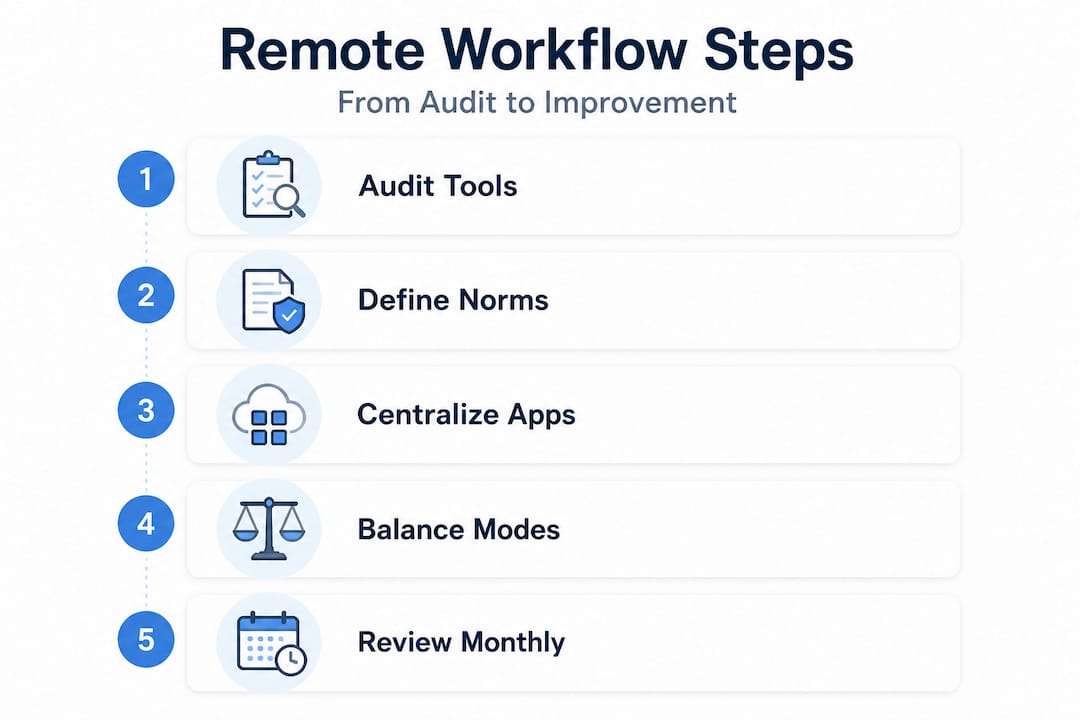
What field-tested remote teams have learned is that sustainable workflow improvements come in three stages: reduction, then clarification, then iteration. You reduce the noise first. Then you define what the remaining signal should look like. Then you build a monthly rhythm of small improvements so the system stays calibrated to your actual team's needs.
The teams that struggle are those that try to go straight to iteration without doing the hard work of reduction and clarification. They adopt a retrospective process before anyone knows what they're improving. They add async norms before pruning the six channels where nobody could tell you which topic belongs where.
Pro Tip: Run a monthly workflow audit rather than an annual overhaul. A 30-minute monthly review catches drift early. An annual review finds catastrophes. Communication best practices evolve faster than most organizations review them.
The most effective remote team leaders we've observed consistently report the same insight: the goal is not a perfect system. It's a system your team understands, uses, and can improve themselves.
Take your remote workflow to the next level with secure enterprise messaging
Everything covered in this guide points toward the same practical conclusion: your team needs fewer, better platforms that are secure, AI-enabled, and built for the complexity of enterprise communication.

Luxenger is built specifically for organizations that need to consolidate their communication stack without compromising on security or capability. With AI-powered conversation summaries, voice huddles, real-time translation for multilingual teams, and bank-grade encryption, Luxenger gives you the unified foundation this guide describes. Whether you're replacing a fragmented stack or upgrading from a consumer-grade tool, you can explore how Luxenger works as an enterprise messaging platform for teams like yours. When you're ready to move forward, reviewing enterprise messaging pricing takes less than five minutes and gives you a clear picture of what a consolidated, secure messaging environment costs at your team's scale.
Frequently asked questions
What is the most important first step in improving remote team workflow?
Start by auditing your current tools and practices to identify where fragmentation and inefficiency exist. Too many tools overwhelm employees, so understanding what you actually have is the prerequisite for every decision that follows.
How does centralizing communication help remote teams?
Centralizing key communications makes tasks and updates visible to the whole team, reduces app-switching fatigue, and dramatically cuts down on missed messages. Remote work management software that consolidates both communication and workflow coordination is the most reliable way to create this visibility.
Should remote teams use mostly asynchronous or synchronous communication?
An async-first model works best for most enterprise teams, with clearly defined synchronous moments reserved for decisions and conflict resolution. The safer pattern is async by default with deliberate, structured sync exceptions and documented outputs from every real-time session.
How can I build trust in a fully remote team?
Create explicit communication norms and regular feedback loops to foster cooperation and psychological safety. Remote teams see higher productivity when trust and cooperation mechanisms are embedded in the workflow itself, not treated as a culture add-on.