

TL;DR:
- Effective enterprise collaboration tools require strong security, real-time concurrent editing, and deep integrations.
- Successful implementation depends on strategic rollout, governance, onboarding, and ongoing feedback.
- AI-driven automation and analytics enhance workflows, but cultural change and governance are critical for success.
Unlock seamless teamwork with secure, AI-powered collaboration tools
Most enterprise teams have no shortage of collaboration apps. They have chat tools, project boards, video conferencing, file sharing, and a dozen integrations stitching it all together. Yet disconnected workflows and communication silos remain stubborn problems. The issue is not the quantity of tools. It is whether those tools are built for genuine enterprise needs: deep integration, verifiable security, and AI that actually accelerates work rather than adds noise. This guide cuts through the vendor marketing to explain what separates truly effective enterprise team collaboration software from the crowded field of options that look impressive in demos but underdeliver in practice.
Table of Contents
- What is enterprise team collaboration software?
- Key features to look for in enterprise solutions
- Evaluating leading team collaboration software vendors
- Implementation best practices and pitfalls to avoid
- Our perspective: Moving beyond features—what actually drives collaboration success
- Ready to future-proof your team collaboration?
- Frequently asked questions
Key Takeaways
| Point | Details |
|---|---|
| Prioritize key features | Focus on security, AI, integrations, and user governance when choosing team collaboration software. |
| Vendor selection matters | Top-rated platforms like Asana and Adobe Workfront lead on integration and strategy. |
| Implementation is critical | Success depends on pilot testing, stakeholder buy-in, and ongoing governance, not just technology choices. |
| AI enhances productivity | Well-integrated AI can automate workflows and deliver actionable insights for teams. |
What is enterprise team collaboration software?
Let us get precise about what we mean, because the term gets stretched in ways that can mislead procurement decisions.
Enterprise team collaboration software is not just a group chat app or a shared task list. At the enterprise level, it is a category of platforms designed to coordinate work across large, distributed teams with diverse roles, compliance requirements, and technology stacks. That means the tool must handle complex workflows, support governance policies, protect sensitive data, and integrate cleanly with the systems your organization already depends on.
The analyst community has a sharper label for this: Collaborative Work Management. Gartner defines CWM as stand-alone software tools providing task-driven workspaces for planning, coordinating, and automating work, with integrated collaboration, content management, workflows, reporting, AI assistance, and data management. That definition matters because it draws a clear boundary. CWM platforms are not light task managers or simple messaging apps. They are environments built to manage the full lifecycle of work across an enterprise.
Here is what that looks like in practice. A global marketing team coordinates a product launch across four time zones. Legal needs to review assets. Finance needs to approve budgets. Regional leads need localized content. An enterprise collaboration platform connects all of these stakeholders in one environment, with role-based permissions, automated approval workflows, and an AI layer that can flag bottlenecks before they delay the launch.
Traditional tools cannot do this. Email creates fragmented threads where context gets lost. Simple chat apps lack the structure needed to manage complex, multi-team deliverables. Spreadsheets used for project tracking become outdated the moment someone edits them offline. These older approaches were built for a simpler era of work.
Modern enterprise collaboration platforms are built around several essential capabilities:
- Real-time co-editing and communication so teams can work together without version conflicts
- AI-powered assistance for summarizing conversations, auto-assigning tasks, and predicting project risk
- Workflow automation that reduces manual handoffs and repetitive status updates
- Deep application integrations with your ERP, CRM, identity provider, and productivity suite
- Enterprise-grade security including encryption, role-based access controls, and audit logging
- Reporting and dashboards that give leadership real visibility into work progress
If you want a closer look at how top AI collaboration tools are reshaping this category, the differences in AI depth between platforms are striking and worth understanding before you evaluate vendors.
"The shift from traditional project management to CWM is not about adding features. It is about fundamentally changing how work gets planned, executed, and improved across an enterprise."
The bottom line: if a vendor cannot clearly demonstrate how their platform handles governance, security, and AI-driven automation at scale, it is not genuinely enterprise grade.
Key features to look for in enterprise solutions
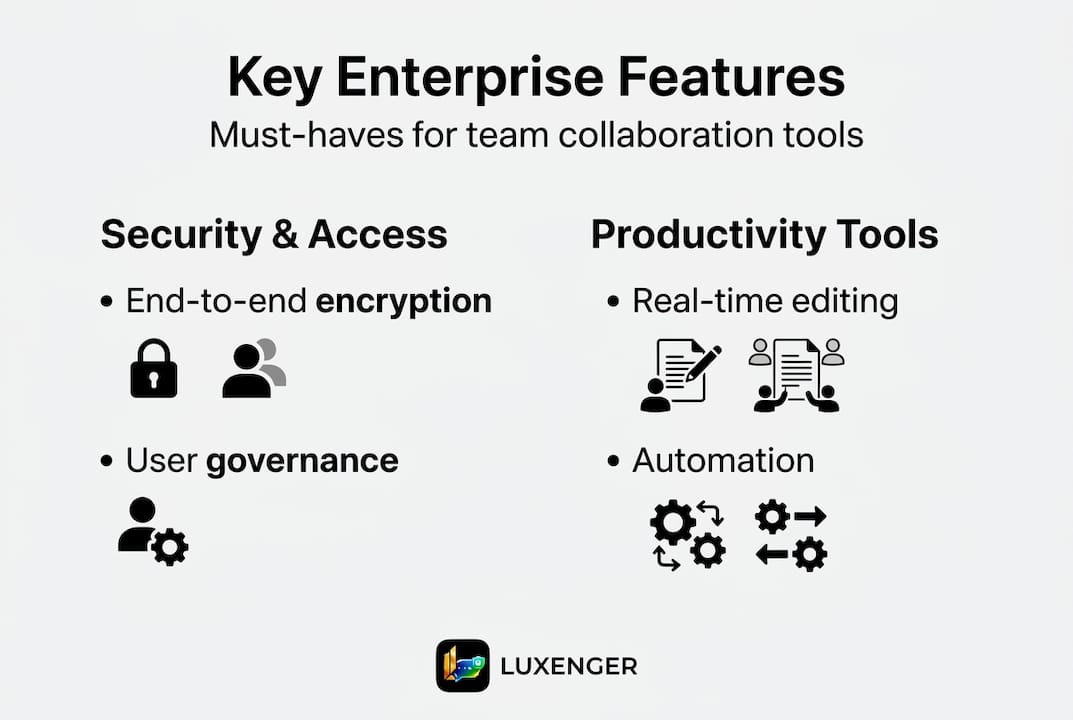
Knowing the category is one thing. Knowing exactly what to demand from a vendor during evaluation is another. Here are the five features that separate serious enterprise platforms from well-designed but limited tools.
1. Enterprise-grade security
Security is not a feature tier. It is a baseline requirement. At the enterprise level, you need end-to-end encryption for data in transit and at rest, single sign-on (SSO) integration with your identity provider, multi-factor authentication (MFA), granular role-based access controls, and detailed audit logs for compliance reporting. Any platform that cannot produce a SOC 2 Type II report or equivalent certification should be removed from your shortlist immediately.
2. Real-time collaboration with high concurrency
Enterprise teams do not take turns. Multiple people need to edit documents, update task boards, and communicate simultaneously without experiencing conflicts or data loss. This sounds basic, but many platforms degrade under high concurrency loads. Test this explicitly during your pilot.

3. AI-driven workflow automation
This is where AI transformation in team messaging becomes mission-critical for enterprise buyers. CWM mechanics include AI for summaries, task creation, and risk prediction, with Forrester emphasizing that integration depth and data quality are what make AI outputs actionable rather than generic. An AI layer trained on poor or siloed data will surface irrelevant recommendations. Demand to see how the platform handles AI data governance, not just what the AI features are.
4. Deep application integrations
The average enterprise runs dozens of specialized tools. Your collaboration platform needs to connect meaningfully with your ERP, HRIS, CRM, cloud storage, and identity systems. Look for native integrations with bi-directional sync, not just one-way data pulls. Shallow integrations that only push notifications are not enough.
5. Advanced reporting and dashboards
Leaders need visibility. Teams need accountability. Dashboards that surface workload distribution, project health, and resource utilization give IT and communications managers the data needed to make informed decisions and justify platform ROI.
Pro Tip: During your vendor pilot, simulate a scenario where 200 or more users simultaneously edit shared workspaces. Most platform breakdowns, including security permission errors and data sync failures, only surface under realistic load conditions. Do not sign a contract until you have tested concurrency at scale.
Understanding why organizations choose AI collaboration tools over traditional options comes down to one consistent finding: AI-driven platforms reduce manual overhead and surface insights that human coordination alone would miss.
Your vendor evaluation checklist should cover:
- Can the vendor provide SOC 2 Type II and relevant compliance documentation?
- Does the platform support SSO and MFA with your existing identity provider?
- What AI models power the platform, and how is data used or retained?
- How many native integrations exist, and are they bi-directional?
- What does the vendor's SLA look like for uptime and incident response?
- Can the platform scale to your projected user count without performance degradation?
Evaluating leading team collaboration software vendors
Analyst evaluations give you a structured starting point, but knowing how to read them critically is just as important as knowing the rankings.
The Forrester Wave Q2 2025 evaluated 11 CWM vendors. Leaders include Adobe Workfront and Asana, with Asana earning the top position in Strategy and the highest scores across 9 individual criteria, including Enterprise Work Management. Quickbase ranked as a Strong Performer. These rankings reflect current market reality, but your specific use case, industry compliance requirements, and existing tech stack should always be the final filter.
Here is a practical comparison of five leading platforms based on analyst findings and enterprise selection criteria:
| Vendor | Security depth | AI capabilities | Integration breadth | Enterprise focus | Best for |
|---|---|---|---|---|---|
| Asana | Strong | High | Very broad | Very high | Cross-functional enterprise teams |
| Adobe Workfront | Very strong | High | Deep creative/marketing | Very high | Marketing ops, creative workflows |
| monday.com | Strong | Moderate | Broad | Moderate to high | Mid-market to enterprise |
| Wrike | Strong | Moderate | Broad | High | Project-heavy organizations |
| Quickbase | Strong | Moderate | Customizable | Moderate | Data-driven, low-code use cases |
Asana's top ranking in Forrester's strategy criteria reflects its consistent investment in AI-powered work management and enterprise governance features. Adobe Workfront's strength lies in its deep roots in creative operations and its native integration with the Adobe ecosystem, making it the natural choice for marketing-led organizations.
One common mistake IT managers make is treating analyst quadrants as the final answer. Forrester and Gartner evaluations are built around generalized criteria. Your organization's requirements may weight security compliance far more heavily than the analyst rubric does. Or your integration requirements may be highly specific to your industry's software stack.
Look for AI features for team messaging when comparing platforms, because the quality of AI-generated summaries, task suggestions, and risk alerts varies significantly between vendors, even among those ranked highly by analysts.
The practical takeaway: use analyst reports to build your shortlist, then run structured pilots against your own environment and user scenarios to make the final call.
Implementation best practices and pitfalls to avoid
Selecting the right platform is only half the battle. Many enterprise collaboration initiatives fail not because the tool was wrong, but because the rollout was poorly planned.
A successful implementation follows a deliberate sequence:
- Start with a scoped pilot involving one or two teams with well-defined use cases, not a company-wide launch
- Secure stakeholder buy-in early by involving department heads, IT security, and end users in the selection process, not just procurement
- Configure governance policies before launch, including data retention rules, access controls, and naming conventions for workspaces and channels
- Build a structured training program tailored to different user roles, not a single generic onboarding session
- Establish an ongoing feedback loop with a designated internal champion who collects user concerns and escalates platform issues to the vendor
- Run a formal post-launch review at 30, 60, and 90 days to assess adoption rates, identify bottlenecks, and adjust configuration
One insight from expert implementation analysis is worth internalizing: teams need to balance action bias with structured feedback and clear decision-makers to avoid creating new silos within the collaboration tool itself. A platform that everyone uses differently, with no shared conventions, recreates the chaos it was supposed to solve.
"The most sophisticated collaboration platform becomes another source of noise if teams do not agree on how, when, and why to use it."
Pro Tip: During your pilot, deliberately test high-concurrency edge cases. Simulate scenarios where 50 or more users simultaneously edit shared documents or trigger automated workflows. Security permission errors and sync failures almost always surface under these conditions, not during a standard demo.
Refer to a solid AI-powered communication guide to understand how to structure information flows before you configure your platform. The architecture of your channels, workspaces, and notification policies should reflect how your teams actually work, not how the vendor's default template suggests you work.
For organizations in regulated industries, reviewing enterprise messaging security best practices before finalizing your configuration is non-negotiable. Misconfigured access controls and unreviewed data retention policies are where compliance exposures typically originate, and finding them post-launch is far more costly than addressing them during setup.
Tool fatigue is a real risk. If the platform adds complexity without reducing friction, adoption will stall within weeks. Governance and change management are not optional extras. They are the work that makes the technical investment pay off.
Our perspective: Moving beyond features—what actually drives collaboration success
After watching enterprise collaboration initiatives succeed and stumble, one pattern stands out clearly. Organizations that spend the most time comparing vendor feature matrices tend to have the most troubled rollouts. The teams that invest in rollout strategy and cultural alignment, even with a slightly less feature-rich tool, consistently see stronger adoption and measurable ROI.
The uncomfortable truth is that most mature enterprise platforms in the CWM category are closer in capability than their marketing suggests. The real differentiator is not which vendor has the most AI features. It is whether your organization can build the governance habits and feedback loops that make any tool work well over time.
Change management is consistently underestimated. Employees who feel the platform was chosen for them rather than with them will work around it, not within it. Executive sponsors who treat the launch as a one-time IT project rather than an ongoing organizational habit will see engagement drop within months.
We believe the right framing is this: the platform is infrastructure, and culture is the application running on top of it. Getting the infrastructure right matters. But without the cultural layer, even the best infrastructure sits idle.
For a practical starting point on improving efficient team messaging steps, the focus should be on simplifying information flows before adding more tools or features.
Ready to future-proof your team collaboration?
The insights in this guide give you a clear framework: define your enterprise requirements precisely, evaluate vendors against real-world criteria rather than feature lists, and invest as much in rollout governance as you do in platform selection.

Luxenger is built for exactly this challenge. As an enterprise-grade messaging and collaboration platform with bank-level security, AI-powered conversation summaries, voice huddles, and real-time multilingual translation, it delivers the integration depth and security rigor that medium and large enterprises require. Explore Luxenger for enterprise collaboration to see how it fits your organization's communication architecture. When you are ready to evaluate plans and ROI, the Luxenger pricing page gives you a clear starting point for building your business case.
Frequently asked questions
What is the difference between CWM and traditional project management software?
CWM offers integrated real-time collaboration, AI, automation, and deep integrations for ongoing teamwork, not just project planning. Unlike traditional PM tools, Gartner's CWM definition includes AI assistance, content management, and continuous workflow automation as core components.
How does AI improve team collaboration software for enterprises?
AI accelerates productivity by automating workflows, summarizing content, predicting risks, and providing actionable insights. Forrester's guidance emphasizes that data quality and integration depth determine whether AI outputs are genuinely useful or just noise.
Which vendors are leaders in enterprise team collaboration software?
According to the Forrester Wave Q2 2025, Asana and Adobe Workfront lead the market, with Asana earning top scores across 9 criteria and Quickbase recognized as a Strong Performer.
What are common pitfalls when implementing team collaboration software?
Lack of governance, inadequate training, and over-integrating tools without clear processes are the most common failure points. Expert analysis also highlights the risk of creating new silos within the platform when teams lack shared conventions and clear decision-making structures.