

TL;DR:
- Secure, deliberate AI deployment can lead to significant productivity gains when proper guardrails are in place.
- AI reshapes organizational roles, favoring high-wage strategic positions and reducing entry-level tasks.
- Workflow redesign and human collaboration are essential to realize AI's full benefits and prevent increased workloads.
AI was supposed to make work easier. Instead, many enterprise teams are logging more hours, fielding more requests, and managing more output than ever before. That is not a failure of the technology. It is a signal that most organizations are deploying AI without a clear strategy for what comes next. For IT managers evaluating workplace AI in 2026, the gap between vendor promises and operational reality is significant. This guide breaks down what the research actually shows about productivity gains, job role shifts, security requirements, and the hidden complexity that most AI rollout plans ignore.
Table of Contents
- AI in the workplace: tangible productivity gains and secure infrastructure
- AI's changing impact on job roles and organizational structure
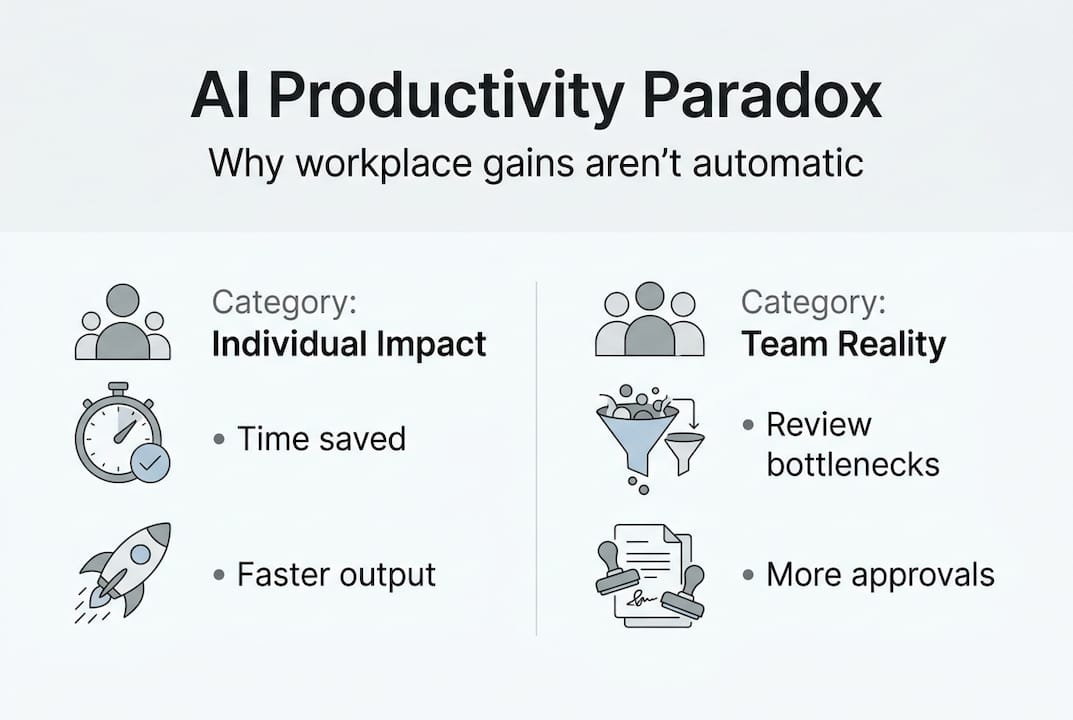
- The productivity paradox: why AI doesn't always reduce workload
- Practical steps for IT leaders: maximizing AI's workplace benefits and minimizing risks
- What most AI workplace articles miss: the human and workflow realities
- Bring secure, AI-powered productivity to your organization
- Frequently asked questions
Key Takeaways
| Point | Details |
|---|---|
| AI delivers real gains | Securely deployed AI can boost individual productivity by up to 73 percent, especially with strong privacy controls. |
| Roles and hierarchies shift | AI adoption suppresses hiring for routine roles but can expand opportunities in high-wage, high-value positions. |
| Productivity paradox exists | Teams often see less productivity improvement than individuals, and unchecked AI may intensify work instead of reducing it. |
| Strategic deployment is key | IT leaders should prioritize security, privacy, and adaptive workflows for successful AI integration in the workplace. |
AI in the workplace: tangible productivity gains and secure infrastructure
The productivity case for enterprise AI is real, but it comes with a critical qualifier: results depend almost entirely on how securely and deliberately the technology is deployed. A 73% productivity gain rate among users of secure internal AI tools, with an average of five hours saved per week, is not a marketing number. It reflects what happens when AI is implemented with proper guardrails, encryption, and access controls in place.
For IT leaders, "guardrails" means more than just content filters. It means role-based access control (RBAC), which ensures employees only interact with AI models trained on data they are authorized to see. It means end-to-end encryption for all AI-generated outputs shared across messaging channels. And it means audit logging, so compliance teams can trace every AI-assisted decision back to its source. These are not optional features. They are the foundation of any enterprise-grade AI deployment.
Federated learning is one of the most underutilized tools in this space. Instead of centralizing sensitive employee or customer data to train a productivity model, federated learning keeps data on local devices or servers and only shares model updates. This approach supports secure AI communication without exposing raw data, which is critical for organizations operating under GDPR, HIPAA, or similar frameworks.
The most common tasks that AI assistants handle in enterprise environments include:
- Summarizing long meeting transcripts and conversation threads
- Drafting routine communications and status updates
- Flagging priority items from high-volume message queues
- Translating content for multilingual teams in real time
- Generating first-draft reports from structured data
These are not trivial time savings. When multiplied across a team of 200 people, five hours per week per person equals roughly 1,000 hours of recovered capacity every week. The organizations capturing that value are the ones treating security as a prerequisite, not an afterthought. Exploring AI collaboration tools with built-in compliance features is a practical starting point.
Pro Tip: Before selecting any AI productivity tool, audit its data handling architecture. If the vendor cannot clearly explain how your data is isolated, encrypted, and access-controlled, that is a disqualifying gap for enterprise use.
AI's changing impact on job roles and organizational structure
Productivity gains at the individual level do not automatically translate into organizational stability. AI is reshaping hiring patterns in ways that IT decision-makers need to understand before they finalize adoption roadmaps.

Research shows that AI suppresses hiring in exposed roles, with a 13 to 20 percent drop in job postings for young workers in AI-adjacent positions. At the same time, high-wage roles that use AI to amplify output are growing. The pattern is clear: AI does not eliminate work uniformly. It concentrates opportunity at the top and compresses entry points at the bottom.
For organizational structure, the AI labor market impact is already flattening hierarchies. When AI handles the coordination, summarization, and reporting tasks that middle management once owned, fewer management layers are needed. Gartner forecasts that by 2026, organizations with mature AI adoption will operate with notably fewer hierarchical tiers than their pre-AI counterparts.
"The enterprises that will lead are not those that simply automate existing roles. They are the ones that redesign roles around what AI cannot do: judgment, relationship management, and strategic decision-making." — Gartner, 2026 Workforce Forecast
Here is a comparison of roles most and least affected by current AI adoption:
| Role category | AI impact level | Outlook |
|---|---|---|
| Data entry and processing | Very high | Significant reduction |
| Junior analyst positions | High | Partial automation |
| Senior strategy roles | Low | Growth with AI support |
| Creative and design leads | Moderate | Augmented, not replaced |
| IT architecture and security | Low | Strong demand growth |
For IT leaders, the practical steps to prepare your organization include:
- Audit current roles for AI exposure and flag positions where task automation exceeds 50 percent of daily work.
- Partner with HR to design upskilling programs that redirect affected employees toward judgment-intensive work.
- Update job descriptions to reflect AI-assisted workflows before the next hiring cycle.
- Align with operations on which AI tools to standardize, using a structured framework for choosing AI tools that fits your industry's compliance requirements.
- Build a governance committee that includes IT, HR, and legal to oversee ongoing AI role redesign.
The future of team AI is not a replacement story. It is a redesign story, and IT leaders who get ahead of it will have a significant structural advantage.
The productivity paradox: why AI doesn't always reduce workload
Here is the uncomfortable truth that most AI vendor decks skip: individual productivity gains and organizational productivity gains are not the same thing. AI intensifies work rather than reducing it in many team environments, with individuals saving an average of 4.11 hours per week while teams gain only 1.5 hours collectively. The gap is not a rounding error. It reflects a structural problem in how AI-generated output is consumed.
When one person can produce three times the content, code, or analysis they could before, someone else has to review, approve, and act on that output. If the downstream workflow has not been redesigned to handle increased volume, the net effect is more work, not less. This is the productivity paradox in practice.
Traditional AI automates discrete, repetitive tasks. Generative AI (GenAI) does something different: it assists with creative work, decision support, and open-ended problem solving. That distinction matters because GenAI output requires more human judgment to validate, not less. The future of AI in communication depends on organizations building review workflows that match the speed of AI output.
Common friction points when scaling AI across enterprise teams include:
- Output volume outpacing review capacity in approval chains
- Inconsistent AI tool adoption creating information silos between departments
- Employees spending time correcting AI errors rather than doing original work
- Meeting overload as teams convene to align on AI-generated recommendations
- Lack of clear ownership for AI-assisted decisions
The data also shows a counterintuitive pattern: the more capable the AI tool, the more work it can generate. AI meeting assistants that summarize calls and auto-generate action items are genuinely useful, but if those action items are not triaged effectively, they simply add to the backlog. The solution is not to use less AI. It is to redesign workflows around AI output velocity.
Practical steps for IT leaders: maximizing AI's workplace benefits and minimizing risks
Knowing the risks is only useful if you have a clear path forward. Here is how enterprise IT leaders can extract real value from AI while keeping security and scalability intact.
- Start with a security-first architecture review. Before any AI tool goes live, confirm it supports end-to-end encryption, RBAC, and data residency controls that match your regulatory environment.
- Run a controlled pilot with one team before scaling. Measure both individual time savings and team-level output changes to identify workflow friction early.
- Define AI governance policies that specify who can use which tools, on what data, and with what level of human review required before AI outputs are acted upon.
- Integrate AI into your existing secure AI messaging platforms rather than running parallel toolsets that fragment communication.
- Build a feedback loop. Collect structured input from employees every 30 days on where AI is helping and where it is creating new friction.
Pro Tip: Deploy federated learning models for any AI system that analyzes internal communication or productivity patterns. These models achieve up to 98.9% accuracy while keeping raw data on-premises, which is the only architecture that satisfies both performance and privacy requirements at enterprise scale.
Key risk factors to monitor and mitigate:
- Shadow AI adoption: Employees using unauthorized AI tools that bypass your security stack
- Model drift: AI recommendations becoming less accurate over time without retraining schedules
- Compliance gaps: AI tools processing regulated data without proper audit trails
- Over-reliance: Teams losing the ability to perform tasks without AI assistance
For scalable adoption across multiple regions and teams, follow the AI team messaging steps framework: standardize tools first, then localize configurations for language, compliance, and workflow needs. Trying to customize before standardizing is one of the most common and costly mistakes in enterprise AI rollouts.
What most AI workplace articles miss: the human and workflow realities
Most AI workplace guides treat the technology as the primary variable. Get the right tool, configure it correctly, and results follow. That framing misses the most important factor: whether the humans and workflows around the tool are ready to absorb what it produces.
IT cannot drive a successful AI rollout alone. It requires active collaboration with HR on role redesign, with operations on workflow restructuring, and with leadership on cultural expectations. Employees who distrust AI tools will work around them, creating exactly the shadow adoption risks that security teams spend months trying to prevent.
The enterprises that consistently win with AI share one characteristic: they treat secure communication and employee trust as core infrastructure, not soft considerations. An enterprise messaging strategy that integrates AI transparently, with clear policies on how AI is used and what data it touches, builds the trust that makes adoption stick.
Real productivity does not come from deploying AI. It comes from redesigning how your organization works around what AI makes possible.
That redesign is harder than buying software. It is also the only thing that produces durable results.
Bring secure, AI-powered productivity to your organization
The research is clear: AI delivers measurable productivity gains when deployed with the right security architecture and workflow strategy. But finding a platform that combines enterprise-grade security with genuinely useful AI features is harder than it should be.

Luxenger is built specifically for this challenge. As an enterprise messaging platform with bank-grade encryption, AI-powered conversation summaries, real-time translation, and voice huddles, it gives IT leaders the tools to deploy AI communication at scale without compromising security. Whether you are replacing Slack, Microsoft Teams, or building a new communication stack from scratch, explore Luxenger's enterprise pricing to find the right fit for your organization's size and compliance requirements.
Frequently asked questions
How does AI actually improve productivity in the workplace?
AI handles repetitive, high-volume tasks like summarization, drafting, and data processing, saving employees up to 5 hours per week when deployed with proper security controls and clear workflow integration.
What roles are most affected by AI adoption?
Entry-level and task-repetitive roles see the most suppression, with a 13 to 20 percent drop in hiring for AI-exposed positions, while high-wage strategic roles tend to grow as AI amplifies their output.
Does AI adoption make teams more efficient overall?
Not automatically. While individuals gain significant time back, team-level gains average just 1.5 hours per week without deliberate workflow redesign to handle increased AI-generated output.
How can IT leaders keep AI deployments secure?
Prioritize platforms with end-to-end encryption, RBAC, and federated learning models that preserve data privacy while maintaining high accuracy, and enforce governance policies before scaling adoption.