

TL;DR:
- Choosing enterprise collaboration tools requires evaluating security, governance, and integration capabilities beyond just features. Enterprises must prioritize certifications, access controls, data privacy, AI transparency, and compliance tools to mitigate security risks and regulatory exposure. Successful adoption depends on usability, trust, and effective governance, with vendors like Luxenger providing secure, AI-enabled messaging tailored for regulated industries.
Choosing the right collaboration platform sounds straightforward until your legal team flags a compliance gap, your security team questions AI data handling, and your IT team discovers the tool doesn't integrate with your identity provider. Enterprises face a genuinely difficult problem: the collaboration features that drive productivity can also introduce security vulnerabilities and regulatory exposure if they aren't properly governed. With AI capabilities evolving rapidly and vendor feature sets changing every quarter, IT and communications managers need a clear, structured way to evaluate what actually matters at enterprise scale.
Table of Contents
- How to evaluate enterprise collaboration features
- Top collaboration features enterprises should demand
- How do major platforms compare on collaboration essentials?
- Matching collaboration features to enterprise needs
- Our perspective: Why feature lists aren't enough for real-world enterprise collaboration
- See how Luxenger delivers secure collaboration for enterprises
- Frequently asked questions
Key Takeaways
| Point | Details |
|---|---|
| Security is foundational | Enterprises should insist on strong security protocols, certifications, and granular permissions in collaboration tools. |
| AI must support governance | Choose AI features that respect access controls and offer transparency for compliance and trust. |
| Match features to needs | Map collaboration capabilities to your organization’s specific use cases, from compliance to remote teamwork. |
| Ecosystem fit matters | Select collaboration platforms that fit your company’s existing technology, workflows, and access control structure. |
How to evaluate enterprise collaboration features
With that challenge in mind, let's break down what matters most when evaluating these tools.
Enterprise collaboration decisions aren't just about features. They're about trust, governance, and long-term operational fit. A tool that looks impressive in a demo can become a compliance liability when it meets the reality of your organization's data policies and regulatory requirements. The evaluation framework needs to address multiple dimensions simultaneously.
Here are the core criteria every enterprise should assess:
- Security certifications and audit evidence: Look for SOC 2 Type 2 and ISO 27001 as baseline. Vendors should provide actual audit reports, not just marketing claims. The difference matters enormously when regulators come knocking.
- Access controls and identity management: Single sign-on (SSO), multi-factor authentication (MFA), and role-based access controls must integrate cleanly with your existing identity provider, whether that's Okta, Azure AD, or another solution.
- Data privacy and residency: Enterprise data often has geographic constraints. Confirm where data is stored and processed, and whether the vendor offers region-specific hosting options.
- AI governance and transparency: AI-powered features must come with clear documentation on how they use your data, who can access AI-generated outputs, and what controls exist to restrict sensitive information.
- Integration ecosystem: A tool that doesn't connect cleanly to your existing HR, ticketing, CRM, or security information and event management (SIEM) platforms creates workflow friction and potential data silos.
- Compliance tooling: Audit logs, data loss prevention (DLP), eDiscovery support, and communication compliance capabilities are non-negotiable for regulated industries.
Enterprise-grade features cover much more than feature checkboxes. The evaluation process must include hands-on testing by your security and compliance teams, not just a product overview from a vendor sales rep.
"Enterprise collaboration tools prioritize security features like SOC 2 Type 2, ISO 27001 certifications, SSO, MFA, data encryption in transit and at rest, and granular permission controls."
Pro Tip: Request the vendor's most recent SOC 2 Type 2 audit report directly. If they hesitate or redirect you to a summary document, that's a red flag worth investigating further before you move into contract negotiations.
The real trap enterprises fall into is confusing feature availability with governance readiness. A platform might technically support MFA, but if it's not enforced by default or if exceptions are easy to create, the control is largely decorative. When evaluating AI-powered collaboration tools, always ask whether AI features respect existing permission structures or whether they create new data access pathways that bypass your current controls.
Top collaboration features enterprises should demand
Armed with an evaluation framework, let's explore which features move the needle for large organizations.
Not all features deserve equal weight. Some are hygiene factors and their absence disqualifies a vendor outright. Others are differentiators that separate good platforms from great ones. Here's what belongs on your non-negotiable list:
-
MFA and SSO with conditional access: Authentication isn't optional. Platforms must support MFA with adaptive or conditional access policies that respond to device posture, location, and risk signals. SSO integration reduces credential sprawl and supports centralized deprovisioning when employees leave.
-
End-to-end encryption in transit and at rest: Data should be encrypted using industry-standard protocols (TLS 1.2 or higher in transit, AES-256 at rest). Verify that encryption extends to all data types including files, messages, meeting recordings, and AI-generated summaries.
-
Information Barriers: For enterprises in financial services, legal, or any sector where internal conflicts of interest must be managed, Information Barriers prevent unauthorized communication between specific user groups. This isn't a nice-to-have; it's often a regulatory requirement.
-
Communication compliance tools: Automated scanning of communications for policy violations, insider threats, or regulatory breaches protects the organization and supports governance requirements. These tools should be configurable to your specific policies.
-
Audit logs and eDiscovery: Complete, tamper-evident audit logs that capture all user activity are essential for incident response and legal holds. eDiscovery support simplifies the process of fulfilling legal requests without manual trawling through message archives.
-
Granular AI permissioning: AI features like conversation summaries, smart search, and content generation must respect data access boundaries. An AI tool that surfaces confidential HR conversations to a manager in a different department creates serious liability.
"Microsoft Teams provides defense-in-depth security, Zero Trust, Least Privilege, TLS/HTTPS encryption, Modern Authentication with MFA and Conditional Access, Communication Compliance for detecting inappropriate messages, Information Barriers to restrict communication between groups, DLP, eDiscovery, and audit logs."
The depth of compliance tooling available in leading platforms has raised the bar for what enterprises should expect as a baseline. When reviewing AI tools for enterprise productivity, prioritize those that explicitly document their data governance posture and provide admin controls that align with your messaging security standards.
One underappreciated feature is role-based DLP (data loss prevention) policy enforcement. Rather than blanket rules that frustrate employees, granular DLP lets you apply stricter controls to high-risk roles while maintaining productivity for the broader workforce. That balance between security and usability is where many platforms fall short.

How do major platforms compare on collaboration essentials?
Now, let's see how the top tools measure up side-by-side.
A feature-by-feature comparison cuts through vendor marketing quickly. The table below assesses leading enterprise collaboration platforms on the criteria that matter most for IT and communications managers. Ratings reflect general platform capability based on publicly available information and enterprise deployment experience.
| Feature | Enterprise Messaging Platform A | Enterprise Messaging Platform B | Google Workspace | Luxenger |
|---|---|---|---|---|
| SSO and MFA | ✅ Full support | ✅ Full support | ✅ Full support | ✅ Full support |
| End-to-end encryption | ✅ At rest and transit | ✅ At rest and transit | ✅ At rest and transit | ✅ Bank-grade encryption |
| Information Barriers | ✅ Available | ⚠️ Limited | ⚠️ Limited | ✅ Available |
| AI with access controls | ⚠️ Partial | ✅ Strong | ⚠️ Partial | ✅ Governed AI |
| Audit logs and eDiscovery | ✅ Full | ✅ Full | ✅ Full | ✅ Full |
| Real-time translation | ❌ Not native | ❌ Not native | ⚠️ Limited | ✅ Native |
| Communication compliance | ✅ Strong | ⚠️ Moderate | ⚠️ Moderate | ✅ Strong |
| Policy customization depth | ✅ High | ⚠️ Moderate | ✅ High | ✅ High |
You can also review independent collaboration app rankings to see how the broader market assesses these platforms across real enterprise deployments.
Notably, Amazon Q Business features secure generative AI with access controls, SAML 2.0 integration, IAM Identity Center, data source guardrails, and customizable AI apps that preserve existing permissions. This sets a useful reference point for what governed AI in an enterprise context should look like, and it's a reasonable benchmark when evaluating AI features in your collaboration tool.
Pro Tip: When running a pilot, test your existing access control policies against the collaboration tool's permission model before you commit. Surprises in production are expensive. A structured platform comparison can help you pressure-test these assumptions before sign-off.
No platform is perfect across every dimension. The right choice depends heavily on your existing ecosystem. Organizations deeply embedded in the Microsoft 365 stack will find strong reasons to lean toward platforms that integrate natively. Organizations prioritizing multilingual global teams or those wanting tighter AI governance with transparent controls may find that newer, purpose-built platforms serve them better.
Matching collaboration features to enterprise needs
No single tool fits every enterprise's structure. Here's how to align features to your use case.
Enterprise environments aren't homogeneous. A global pharmaceutical company, a regional bank, and a multinational professional services firm all have distinct regulatory obligations, workforce structures, and communication patterns. Feature requirements need to map directly to organizational realities.
Consider these high-stakes scenarios and the features they demand:
- Mergers and acquisitions: During M&A activity, Information Barriers are critical to prevent premature disclosure between deal teams and general staff. Platforms without robust barrier controls create legal and regulatory exposure that can affect deal outcomes.
- Financial services: Firms operating under regulations like FINRA or MiFID II need immutable audit trails, communication archiving, and surveillance-ready compliance tools. Any AI feature that generates or modifies communications must be traceable.
- Healthcare: HIPAA compliance requires strict data access controls, audit logging, and business associate agreements (BAAs) with vendors. AI features that summarize patient-related communications must respect access boundaries at the individual record level.
- Global distributed teams: Real-time translation, multilingual support, and data residency options for regional compliance (GDPR in Europe, PIPL in China) are essential for organizations operating across borders.
The table below maps key enterprise scenarios to the features that address them most directly.
| Scenario | Critical features |
|---|---|
| M&A activity | Information Barriers, granular role controls |
| Financial services | Audit trails, DLP, communication compliance |
| Healthcare | BAA support, access controls, encryption |
| Global teams | Real-time translation, data residency options |
| Regulated industries generally | eDiscovery, immutable logs, policy enforcement |
| Distributed workforces | Granular permissions, SSO, mobile security |
The enterprise messaging security checklist provides a useful framework for mapping these requirements to vendor capabilities systematically. Understanding what defines a communication platform at the enterprise level helps ensure you're comparing tools on the right dimensions rather than surface-level features.
Forrester adoption data consistently shows that enterprises struggle with tool adoption even when the platform technically meets requirements. The gap between capability and realized value is often governance-related, not technical. Platforms that make policy configuration intuitive and visible for IT administrators see materially better compliance rates than those that bury controls in complex admin portals.
One important nuance: Information Barriers as implemented in major platforms offer powerful controls but come with edge cases. Asymmetric policies, where one group can contact another but not vice versa, are not always supported. Organizations with complex internal communication structures need to validate these mechanics in a proof-of-concept environment before full deployment.
Our perspective: Why feature lists aren't enough for real-world enterprise collaboration
Here's what typical selection guides miss.
We've seen enterprises invest heavily in collaboration platforms that check every box on a feature list, then watch adoption stagnate at 30 percent six months post-launch. The technology wasn't the problem. The rollout, governance, and trust-building process was.
Most selection processes optimize for features and price. Very few optimize for change management readiness. When employees don't understand why communication policies exist, when AI features feel opaque or intrusive, and when IT support for the new tool is underfunded, even technically excellent platforms fail to deliver their promised productivity gains.
AI adoption is a particularly acute version of this problem right now. Platforms are racing to add AI-powered summaries, smart search, and generative content features. But without clear data governance policies, without transparent communication to employees about how AI uses their messages and data, and without admin controls that employees trust, AI features become a source of friction and resistance rather than value. The organizations seeing real productivity gains from secure AI collaboration tools are those that invested in governance infrastructure before enabling AI features broadly.
The checklist approach also misses implementation quality. A platform might technically support granular DLP policies, but if configuring those policies requires weeks of specialist work and produces a brittle ruleset that generates constant false positives, the feature provides little practical value. Ease of governance configuration is a feature, and it's rarely on the comparison matrix.
Our strong recommendation: weight governance usability, change management support, and vendor transparency about AI data handling as heavily as you weight technical feature coverage. The platforms that succeed in enterprise environments long-term are those that make compliance easy for administrators and trustworthy for users.
See how Luxenger delivers secure collaboration for enterprises
Ready to put these capabilities into practice? Here's how Luxenger helps enterprises make collaboration seamless and secure.
Luxenger is built specifically for organizations that can't afford to trade security for productivity. With bank-grade encryption, granular access controls, and enterprise-grade collaboration features designed to support regulated industries, Luxenger gives IT and communications managers the tools they need to deploy confidently.
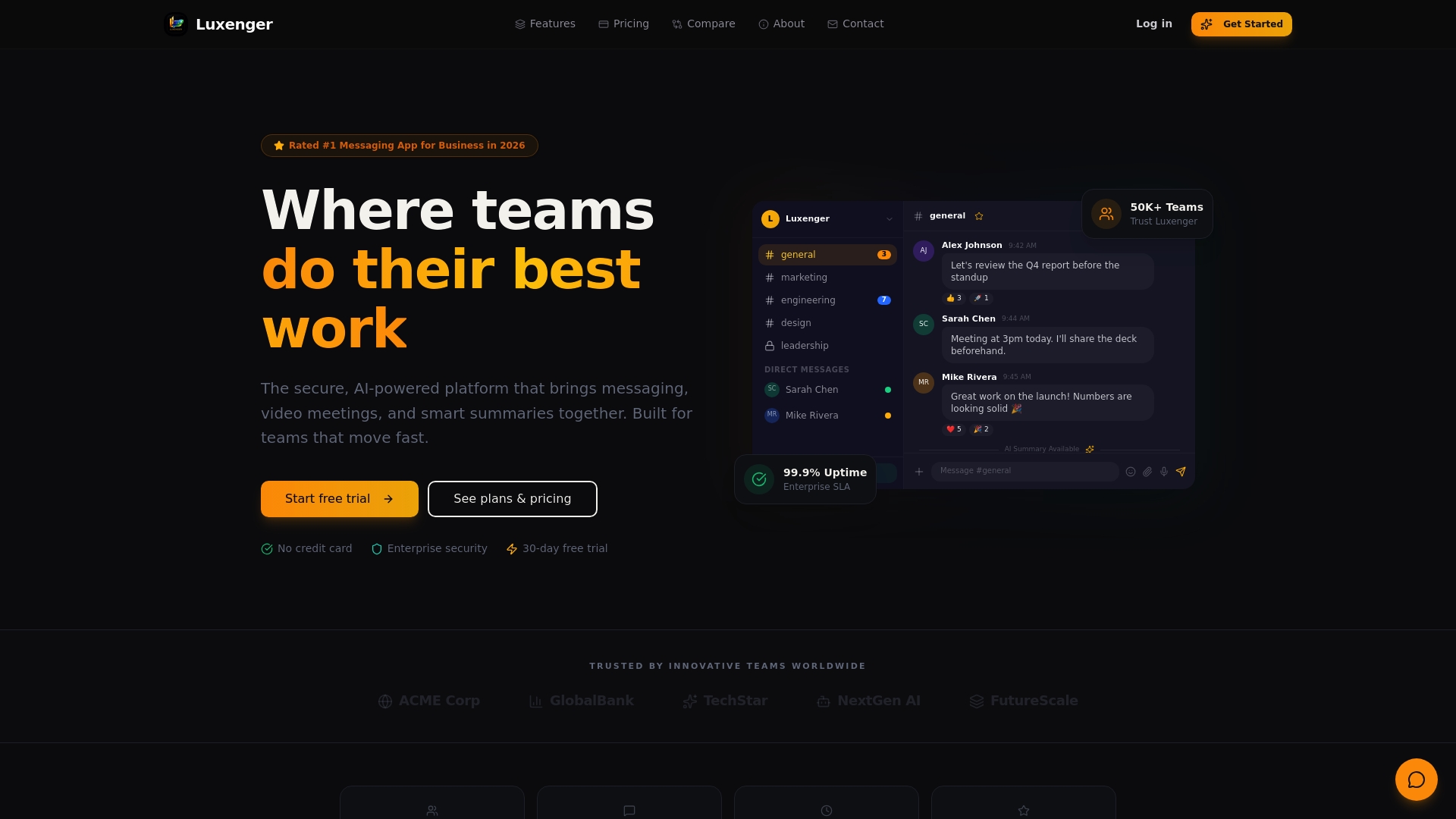
Luxenger's AI-powered summaries, real-time translation for multilingual teams, and voice huddles are governed by transparent access controls that respect your existing permission policies. Whether you're managing compliance across financial services, healthcare, or a globally distributed workforce, Luxenger is built to fit. Explore enterprise messaging pricing to see options tailored to your organization's size and needs, or visit Luxenger's platform overview to see how secure, AI-enhanced messaging works at scale.
Frequently asked questions
What makes a collaboration feature 'enterprise-grade'?
Enterprise-grade features support rigorous security, access controls, certifications, audit trails, and integration with corporate policies. SOC 2 Type 2 and ISO 27001 certifications alongside SSO, MFA, encryption, and granular permission controls are the baseline standards for enterprise qualification.
How can enterprises manage unauthorized internal communications?
Using Information Barriers and compliance policies, enterprises can block or restrict communications between sensitive user groups. Granular controls like Information Barriers prevent unauthorized communications, though asymmetric policies may not be supported in all implementations.
Are AI features in collaboration tools safe for enterprise data?
AI features are safe when there are clear access controls, data governance policies, and transparency about how AI processes and surfaces information. Secure generative AI with access controls and data source guardrails that preserve existing permissions represent the standard enterprises should require.
Why is user adoption still a challenge for enterprise collaboration tools?
Low adoption is usually caused by poor training, unclear governance, or employee mistrust around AI transparency, not feature gaps. Forrester research shows that AI value depends on data quality and governance maturity, and that many enterprises see low adoption despite significant platform investment.